
Sponsored

OP
OP
- Joined
- Jun 27, 2021
- Threads
- 12
- Messages
- 442
- Reaction score
- 751
- Location
- Austin, TX
- Vehicle(s)
- Toyota Tacoma TRD Pro
- Your Bronco Model
- Badlands
- Thread starter
- #17
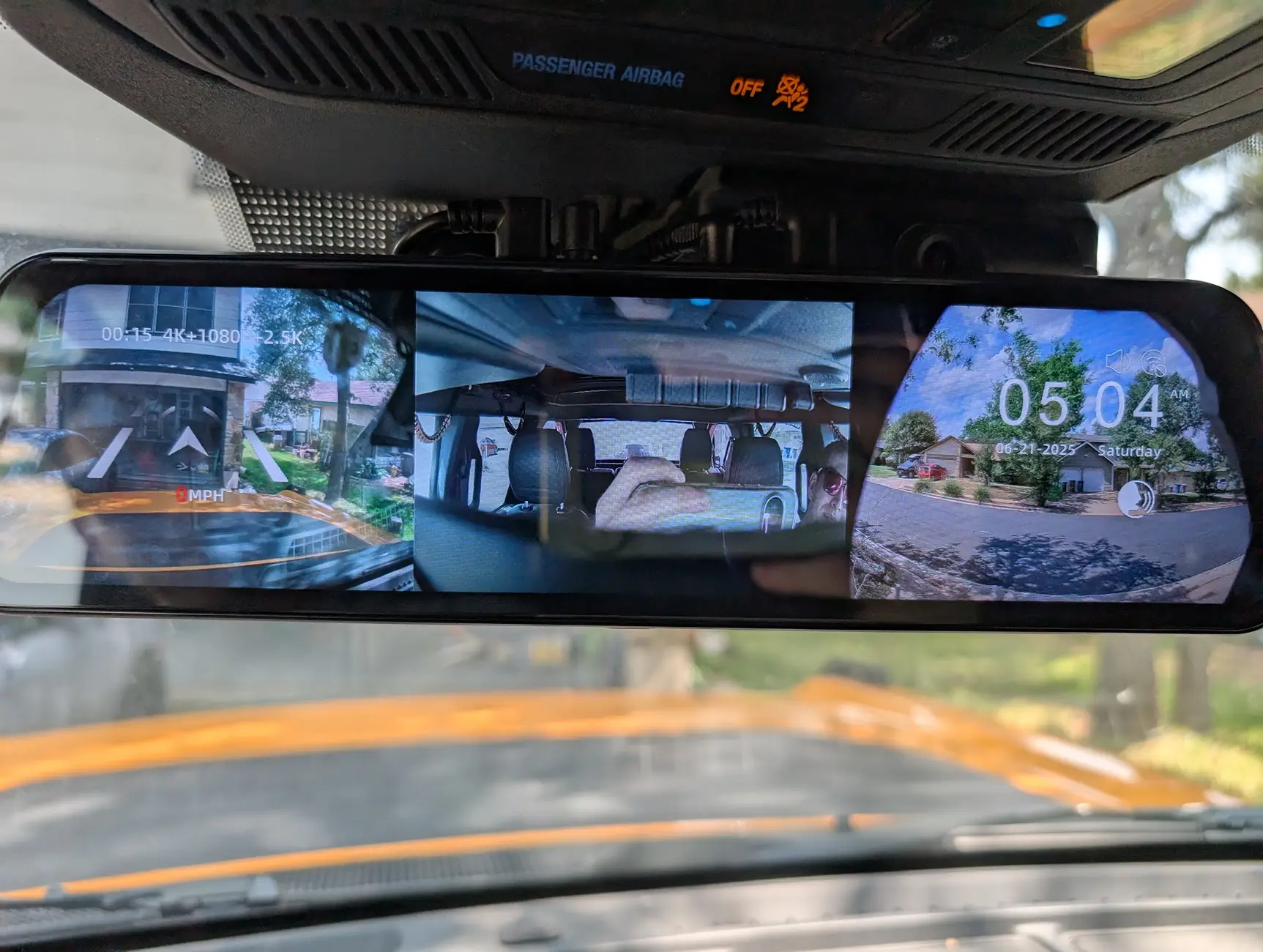
Yeah! You can see the interior camera view the middle here (there is another view option that shows only the cabin camera view, but I didn't snap a photo of it).Do you have the version with the cabin camera? If so, would you be able to post a photo/video showing what that view looks like? I'm curious what kind of coverage the cabin camera provides.
I adjusted the angle of mine a bit, but it does capture a very wide angle - maybe 120 degrees or so

- First Name
- Sean
- Joined
- Jan 13, 2025
- Threads
- 89
- Messages
- 371
- Reaction score
- 228
- Location
- Toledo, OH
- Vehicle(s)
- 2024 2 Door Black Diamond
- Your Bronco Model
- Black Diamond
Do you use the timelapse parking mode? I’ve found it to be hit or miss on whether it actually records. One day it recorded for a few hours after I parked at work, and other days it doesn’t seem to record anything at all. I get the message when powering off the Bronco that it’s entering timelapse mode. Is it possible it’s draining the battery that fast that it cuts it off almost immediately? I’ve never had any issues starting the car back up I’m not sure what else to check.

Thanks for the review. Amazon has the G930 on sale now for $105, I know it's a lower resolution rear cam but the mirror is 2" smaller so it will fit as OEM. I went ahead and bought it for my truck and pick up 2 for my kids. At that price, I don't think I can go wrong.
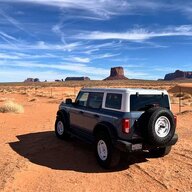

My honest review of the G900 TriPro (interior cabin version).
I installed the dash cam on a 2025 Bronco Heritage.
Camera shake
I bought the oem bracket, and it shook a lot. It turns out there were two issues.
1. The screws attaching the dashcam to the mounting plate were too loose. You need a small set of screwdrivers to screw them in securely. This got rid of a lot of the shaking, but not all.
2. The mounting plate for the rear camera to the windshield. I bought one off amazon. The screws on either the camera or the mounting bracket do not tighten well enough. This allows the camera to shake. I haven't found a fix for this (yet). I think someone taped some sticky parts together to build something to keep it from flopping around on one of the videos I watched. Most times it doesn't shake too much.
The camera noticeably shakes when the road is bumpy, but I can live with this issue for now.
Rear camera issues
The rear camera looks great in the daytime. However, at nighttime, especially if it's dark, this is the worse. The lights from other cars blinds the camera making it almost useless. Headlights turned into awful light blobs. And when there are no lights shining, there is a lot of noise on the dash cam.
The 2nd issue is that the image size does not reflect what you would see in a normal mirror. It looks like the car is far away, but it might be almost be on your bumper when you look out the side mirrors. You can adjust it so that it matches (kinda), but zooming in seems to increase the pixelization, especially at night. In addition, trying to zoom in also can make the picture go up or down, instead. Trying to adjust this just right is really frustrating as you are driving. What would really help to adjust the picture here, is pinch-and-zoom (or unzoom) like on iphone's. Why they don't have this, I don't know.
In addition, the camera forgets your settings when you turn your car off. I think by default, the rear camera view should match what your original mirror view would be. Then you can either try to zoom in or zoom out, if you want. In addition, the default view should be the default resolution before zooming in or out due to the pixelization issue.
One more thing, if you use the dashcam in mirror-only view, then turn the dashcam on, there are two images you can see. The images interfere with each other and is a nightmare to figure out which one to trust. You need to either use the built-in mirror, or tilt the mirror so that only one the dashcam video shows.
The oem bracket with the dashcam has to be a real replacement for the rear view mirror, IHMO. It has to be equal or better than the original. Either with the video playing, or when turned off using the reflecting mirror. With the dashcam turned off, the mirror isn't really the quality of the original mirror. Most of the time, I turn the camera off, and use the mirror because adjusting the camera is too cumbersome, but the mirror is more life-like, except when it gets dark. There are some real issues here. Driving back home thru Arizona 2-way hwy's with no street lights and bright headlights in the rear view mirror was a nightmare. Even more-so if I used the dashcam video screen.
Also, the size of the dashcam seems to be slightly bigger than the original, and it bangs against the window blinds. Maybe the original mirror did, too.
Wifi download
This is painfully slow. In addition, I think, you can only download it when the car is not in driving mode. It was unusually difficult to enter the username/password for the wolfbox.
What would be better is if the wifi can be on all the time, and use the cloud to upload images on-the-fly. If your car was stolen, there is no way to get the video/pics off the dashcam, unless the car is recovered and the dashcam videos haven't been erased by more dashcam recordings (or dashcam stolen, too). This should upload to the cloud like a nest camera does for homes.
I had to use an external card reader to get footage from the dashcam, and the footage I was hoping to still be there, was gone by the time I got to it. It was overwritten. I have a 256gb card in there. A 512gb card might have gotten more footage. In hindsight, it would be good to remove the sd card every 2 days and download images, then put it back. Downloading images using a card reader is also painfully slow. not as much as the wifi download. I might need a better card reader (faster?).
Optional hardwire kit
I tried to install the hardwire kit with my fusebox, but the fuses didn't fit on it. Maybe something changed on the 2025 bronco or something. I was wondering if I could get this to work, but I found the OBD hardwire kit and that solved everything. No more worrying about if you installed the fuse thingies correctly, it just works, and it's so much easier to install than the fuse hardwire kit version.
Going forward
I bought this dashcam because it seemed to be the best. It has a huge replacement mirror display. I bought it right before going on a trip to Mexico for a couple of weeks. I learned all these things the hard way. I'm going to put back my original mirror. However, the front dashcam and the in-cabin camera are great. Even the rear camera video if not too dark, is pretty good for a dashcam (I know there are better). Wolfbox, you should use a 4k (or better) camera for the rear. I'm not sure a 4k camera would be better in the dark. To be a rear-view mirror replacement, the best camera has to be on the rear, IMHO.
I've been thinking of trying the wolfbox center console bracket. I'm not sure if I can return it, I'll have to check the return policy.
In summary
I know I said some harsh things about this camera. This is in hopes of getting a better wolfbox camera down the line. If they can keep improving this camera, they'll have THE winner on their hands. The mirror dashcam is a great idea in theory, not that great in practice (yet). But if done right, it'll be the winner, for sure.
I should also mention that their support was good. I emailed them questions, and got answers in a timely manner.
One thing I didn't mention was the wolfbox app for the mac. With this app, you can play the videos, and on the window a map is displayed where you are. If you are driving, it travels along the map, This is really cool!
I'm not really sure why other reviews haven't mentioned some of the things that I've mentioned. I probably wouldn't have gotten this dashcam if I heard some of the things that I said. Maybe other dashcams are worse? This is my first dashcam.
Wolfbox, if you fix these things I mentioned, I would gladly put it through its paces to give you my opinion of your newer camera.
I installed the dash cam on a 2025 Bronco Heritage.
Camera shake
I bought the oem bracket, and it shook a lot. It turns out there were two issues.
1. The screws attaching the dashcam to the mounting plate were too loose. You need a small set of screwdrivers to screw them in securely. This got rid of a lot of the shaking, but not all.
2. The mounting plate for the rear camera to the windshield. I bought one off amazon. The screws on either the camera or the mounting bracket do not tighten well enough. This allows the camera to shake. I haven't found a fix for this (yet). I think someone taped some sticky parts together to build something to keep it from flopping around on one of the videos I watched. Most times it doesn't shake too much.
The camera noticeably shakes when the road is bumpy, but I can live with this issue for now.
Rear camera issues
The rear camera looks great in the daytime. However, at nighttime, especially if it's dark, this is the worse. The lights from other cars blinds the camera making it almost useless. Headlights turned into awful light blobs. And when there are no lights shining, there is a lot of noise on the dash cam.
The 2nd issue is that the image size does not reflect what you would see in a normal mirror. It looks like the car is far away, but it might be almost be on your bumper when you look out the side mirrors. You can adjust it so that it matches (kinda), but zooming in seems to increase the pixelization, especially at night. In addition, trying to zoom in also can make the picture go up or down, instead. Trying to adjust this just right is really frustrating as you are driving. What would really help to adjust the picture here, is pinch-and-zoom (or unzoom) like on iphone's. Why they don't have this, I don't know.
In addition, the camera forgets your settings when you turn your car off. I think by default, the rear camera view should match what your original mirror view would be. Then you can either try to zoom in or zoom out, if you want. In addition, the default view should be the default resolution before zooming in or out due to the pixelization issue.
One more thing, if you use the dashcam in mirror-only view, then turn the dashcam on, there are two images you can see. The images interfere with each other and is a nightmare to figure out which one to trust. You need to either use the built-in mirror, or tilt the mirror so that only one the dashcam video shows.
The oem bracket with the dashcam has to be a real replacement for the rear view mirror, IHMO. It has to be equal or better than the original. Either with the video playing, or when turned off using the reflecting mirror. With the dashcam turned off, the mirror isn't really the quality of the original mirror. Most of the time, I turn the camera off, and use the mirror because adjusting the camera is too cumbersome, but the mirror is more life-like, except when it gets dark. There are some real issues here. Driving back home thru Arizona 2-way hwy's with no street lights and bright headlights in the rear view mirror was a nightmare. Even more-so if I used the dashcam video screen.
Also, the size of the dashcam seems to be slightly bigger than the original, and it bangs against the window blinds. Maybe the original mirror did, too.
Wifi download
This is painfully slow. In addition, I think, you can only download it when the car is not in driving mode. It was unusually difficult to enter the username/password for the wolfbox.
What would be better is if the wifi can be on all the time, and use the cloud to upload images on-the-fly. If your car was stolen, there is no way to get the video/pics off the dashcam, unless the car is recovered and the dashcam videos haven't been erased by more dashcam recordings (or dashcam stolen, too). This should upload to the cloud like a nest camera does for homes.
I had to use an external card reader to get footage from the dashcam, and the footage I was hoping to still be there, was gone by the time I got to it. It was overwritten. I have a 256gb card in there. A 512gb card might have gotten more footage. In hindsight, it would be good to remove the sd card every 2 days and download images, then put it back. Downloading images using a card reader is also painfully slow. not as much as the wifi download. I might need a better card reader (faster?).
Optional hardwire kit
I tried to install the hardwire kit with my fusebox, but the fuses didn't fit on it. Maybe something changed on the 2025 bronco or something. I was wondering if I could get this to work, but I found the OBD hardwire kit and that solved everything. No more worrying about if you installed the fuse thingies correctly, it just works, and it's so much easier to install than the fuse hardwire kit version.
Going forward
I bought this dashcam because it seemed to be the best. It has a huge replacement mirror display. I bought it right before going on a trip to Mexico for a couple of weeks. I learned all these things the hard way. I'm going to put back my original mirror. However, the front dashcam and the in-cabin camera are great. Even the rear camera video if not too dark, is pretty good for a dashcam (I know there are better). Wolfbox, you should use a 4k (or better) camera for the rear. I'm not sure a 4k camera would be better in the dark. To be a rear-view mirror replacement, the best camera has to be on the rear, IMHO.
I've been thinking of trying the wolfbox center console bracket. I'm not sure if I can return it, I'll have to check the return policy.
In summary
I know I said some harsh things about this camera. This is in hopes of getting a better wolfbox camera down the line. If they can keep improving this camera, they'll have THE winner on their hands. The mirror dashcam is a great idea in theory, not that great in practice (yet). But if done right, it'll be the winner, for sure.
I should also mention that their support was good. I emailed them questions, and got answers in a timely manner.
One thing I didn't mention was the wolfbox app for the mac. With this app, you can play the videos, and on the window a map is displayed where you are. If you are driving, it travels along the map, This is really cool!
I'm not really sure why other reviews haven't mentioned some of the things that I've mentioned. I probably wouldn't have gotten this dashcam if I heard some of the things that I said. Maybe other dashcams are worse? This is my first dashcam.
Wolfbox, if you fix these things I mentioned, I would gladly put it through its paces to give you my opinion of your newer camera.
Last edited:

Thanks for the suggestions. Please try to update our latest firmware to solve some issues. And we'll keep improving our product.My honest review of the G900 TriPro (interior cabin version).
I installed the dash cam on a 2025 Bronco Heritage.
Camera shake
I bought the oem bracket, and it shook a lot. It turns out there were two issues.
1. The screws attaching the dashcam to the mounting plate were too loose. You need a small set of screwdrivers to screw them in securely. This got rid of a lot of the shaking, but not all.
2. The mounting plate for the rear camera to the windshield. I bought one off amazon. The screws on either the camera or the mounting bracket do not tighten well enough. This allows the camera to shake. I haven't found a fix for this (yet). I think someone taped some sticky parts together to build something to keep it from flopping around on one of the videos I watched. Most times it doesn't shake too much.
The camera noticeably shakes when the road is bumpy, but I can live with this issue for now.
Rear camera issues
The rear camera looks great in the daytime. However, at nighttime, especially if it's dark, this is the worse. The lights from other cars blinds the camera making it almost useless. Headlights turned into awful light blobs. And when there are no lights shining, there is a lot of noise on the dash cam.
The 2nd issue is that the image size does not reflect what you would see in a normal mirror. It looks like the car is far away, but it might be almost be on your bumper when you look out the side mirrors. You can adjust it so that it matches (kinda), but zooming in seems to increase the pixelization, especially at night. In addition, trying to zoom in also can make the picture go up or down, instead. Trying to adjust this just right is really frustrating as you are driving. What would really help to adjust the picture here, is pinch-and-zoom (or unzoom) like on iphone's. Why they don't have this, I don't know.
In addition, the camera forgets your settings when you turn your car off. I think by default, the rear camera view should match what your original mirror view would be. Then you can either try to zoom in or zoom out, if you want. In addition, the default view should be the default resolution before zooming in or out due to the pixelization issue.
One more thing, if you use the dashcam in mirror-only view, then turn the dashcam on, there are two images you can see. The images interfere with each other and is a nightmare to figure out which one to trust. You need to either use the built-in mirror, or tilt the mirror so that only one the dashcam video shows.
The oem bracket with the dashcam has to be a real replacement for the rear view mirror, IHMO. It has to be equal or better than the original. Either with the video playing, or when turned off using the reflecting mirror. With the dashcam turned off, the mirror isn't really the quality of the original mirror. Most of the time, I turn the camera off, and use the mirror because adjusting the camera is too cumbersome, but the mirror is more life-like, except when it gets dark. There are some real issues here. Driving back home thru Arizona 2-way hwy's with no street lights and bright headlights in the rear view mirror was a nightmare. Even more-so if I used the dashcam video screen.
Also, the size of the dashcam seems to be slightly bigger than the original, and it bangs against the window blinds. Maybe the original mirror did, too.
Wifi download
This is painfully slow. In addition, I think, you can only download it when the car is not in driving mode. It was unusually difficult to enter the username/password for the wolfbox.
What would be better is if the wifi can be on all the time, and use the cloud to upload images on-the-fly. If your car was stolen, there is no way to get the video/pics off the dashcam, unless the car is recovered and the dashcam videos haven't been erased by more dashcam recordings (or dashcam stolen, too). This should upload to the cloud like a nest camera does for homes.
I had to use an external card reader to get footage from the dashcam, and the footage I was hoping to still be there, was gone by the time I got to it. It was overwritten. I have a 256gb card in there. A 512gb card might have gotten more footage. In hindsight, it would be good to remove the sd card every 2 days and download images, then put it back. Downloading images using a card reader is also painfully slow. not as much as the wifi download. I might need a better card reader (faster?).
Optional hardwire kit
I tried to install the hardwire kit with my fusebox, but the fuses didn't fit on it. Maybe something changed on the 2025 bronco or something. I was wondering if I could get this to work, but I found the OBD hardwire kit and that solved everything. No more worrying about if you installed the fuse thingies correctly, it just works, and it's so much easier to install than the fuse hardwire kit version.
Going forward
I bought this dashcam because it seemed to be the best. It has a huge replacement mirror display. I bought it right before going on a trip to Mexico for a couple of weeks. I learned all these things the hard way. I'm going to put back my original mirror. However, the front dashcam and the in-cabin camera are great. Even the rear camera video if not too dark, is pretty good for a dashcam (I know there are better). Wolfbox, you should use a 4k (or better) camera for the rear. I'm not sure a 4k camera would be better in the dark. To be a rear-view mirror replacement, the best camera has to be on the rear, IMHO.
I've been thinking of trying the wolfbox center console bracket. I'm not sure if I can return it, I'll have to check the return policy.
In summary
I know I said some harsh things about this camera. This is in hopes of getting a better wolfbox camera down the line. If they can keep improving this camera, they'll have THE winner on their hands. The mirror dashcam is a great idea in theory, not that great in practice (yet). But if done right, it'll be the winner, for sure.
I should also mention that their support was good. I emailed them questions, and got answers in a timely manner.
One thing I didn't mention was the wolfbox app for the mac. With this app, you can play the videos, and on the window a map is displayed where you are. If you are driving, it travels along the map, This is really cool!
I'm not really sure why other reviews haven't mentioned some of the things that I've mentioned. I probably wouldn't have gotten this dashcam if I heard some of the things that I said. Maybe other dashcams are worse? This is my first dashcam.
Wolfbox, if you fix these things I mentioned, I would gladly put it through its paces to give you my opinion of your newer camera.
Regards.
Sponsored
Similar threads


- Replies
- 2
- Views
- 1,615

- Replies
- 44
- Views
- 16,903


