Sponsored

True Fullscreen w/ Sync4?

Slonco

Big Bend
Member
First Name
Justin
Joined
Sep 13, 2024
Threads
4
Messages
12
Reaction score
1
Location
Kentucky, USA
Vehicle(s)
Big Bend
Your Bronco Model
Big Bend
So, I love the 12" screen in my new Bronco. However, what I miss from the old 8" is that Android Auto/CarPlay is truly fullscreen. As seen in the attached picture & as far as I know, the 12" does not do this. It always has the blue bars at the top & bottom. This eats up so much screen real estate that I would like to use for music/maps split screen. Especially considering that much of the info in the information bar is redundant... Is there anyway to remove these?

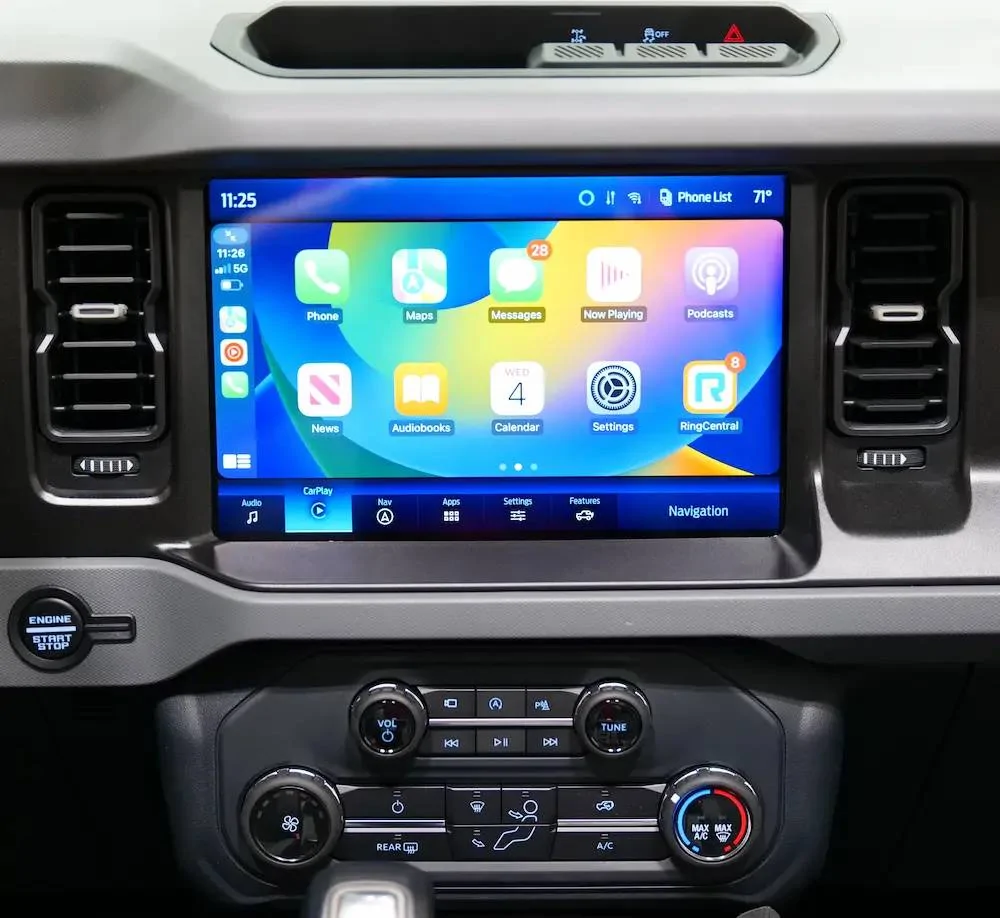
Ford Bronco True Fullscreen w/ Sync4? IMG_20241127_153342
Sponsored


rugedraw

Well-Known Member
First Name
Javier
Joined
Jan 9, 2024
Threads
0
Messages
372
Reaction score
319
Location
Miami, FL
Vehicle(s)
2021 Ford F150 Platinum FX4 EB/2023 Bronco Sport Badlands/1991 Mustang 5.0 coupe
Your Bronco Model
Undecided
So, I love the 12" screen in my new Bronco. However, what I miss from the old 8" is that Android Auto/CarPlay is truly fullscreen. As seen in the attached picture & as far as I know, the 12" does not do this. It always has the blue bars at the top & bottom. This eats up so much screen real estate that I would like to use for music/maps split screen. Especially considering that much of the info in the information bar is redundant... Is there anyway to remove these?
The only way I know of to do this is by using an HDMI interface module to completely hijack the touchscreen and bypass Sync. However, they are pricey and require partial disassembly of the dash to install them since you plug it directly into the APIM. It works by mirroring whatever you're playing on your phone via an HDMI cable.

https://naviks.com/c-1136681-smartphone-mirroring.html

This can also be used to add 360 cams to a vehicle that doesn't have them or add a wireless camera for a trailer/boat which is what I use it for in my truck as well as mirroring my phone.
 
OP
OP

Slonco

Big Bend
Member
First Name
Justin
Joined
Sep 13, 2024
Threads
4
Messages
12
Reaction score
1
Location
Kentucky, USA
Vehicle(s)
Big Bend
Your Bronco Model
Big Bend
Thanks for the info @rugedraw. 🙂

So, is there any danger in using this (e.g., Sync glitches, nonfunctioning touchscreen/controls on steering wheel, etc.)? And either way, would you recommend this route?
 

rugedraw

Well-Known Member
First Name
Javier
Joined
Jan 9, 2024
Threads
0
Messages
372
Reaction score
319
Location
Miami, FL
Vehicle(s)
2021 Ford F150 Platinum FX4 EB/2023 Bronco Sport Badlands/1991 Mustang 5.0 coupe
Your Bronco Model
Undecided
Thanks for the info @rugedraw. 🙂

So, is there any danger in using this (e.g., Sync glitches, nonfunctioning touchscreen/controls on steering wheel, etc.)? And either way, would you recommend this route?
No, it doesn't affect sync in any bad way. No software or config change is needed for it to work. But, when is turned on, it's turned on. Put it in reverse, and no cameras. No notifications on the screen. Nothing. It totally takes over the screen and repurposes it. You'd have to hold the back button on the steering wheel to go back to sync. For what you want to accomplish, I don't recommend it, but is the only way to take over the entire screen. I'll link a short video I posted in the F150 forum of it working when I first enabled turn signal cameras while towing tomorrow. I'd have to dig to find it as it was some time ago.
 

Mjasi3

Wildtrak
Well-Known Member
First Name
Mike
Joined
Dec 10, 2023
Threads
24
Messages
878
Reaction score
566
Location
Chicago
Vehicle(s)
Ford
Your Bronco Model
Wildtrak
So, I love the 12" screen in my new Bronco. However, what I miss from the old 8" is that Android Auto/CarPlay is truly fullscreen. As seen in the attached picture & as far as I know, the 12" does not do this. It always has the blue bars at the top & bottom. This eats up so much screen real estate that I would like to use for music/maps split screen. Especially considering that much of the info in the information bar is redundant... Is there anyway to remove these?

IMG_20241127_153342.webp
I’d love to have the blue bars on top and bottom instead mine are white?!? Must be a setting somewhere
 
OP
OP

Slonco

Big Bend
Member
First Name
Justin
Joined
Sep 13, 2024
Threads
4
Messages
12
Reaction score
1
Location
Kentucky, USA
Vehicle(s)
Big Bend
Your Bronco Model
Big Bend
Thanks again for the info @rugedraw. This doesn't seem to be the solution that I am looking for. Too expensive & cumbersome... 🫤 I wish @Ford Motor Company would make a simple toggle/option to make it true fullscreen. It works so well on the 8", why not make that available for the 12"?
Sponsored


Top