
Sponsored

USB Port Accessory Power Timeout

Braptor787

Raptor
Active Member
First Name
Jay
Joined
Sep 13, 2024
Threads
6
Messages
32
Reaction score
33
Location
SoCal
Vehicle(s)
2024 Bronco Raptor
Your Bronco Model
Raptor
I’m running two small fans in my cargo area to help circulate A/C to the back for my dogs.

In terms of power, option 1 was to run it to the 12V outlet on the right rear side panel with a USB-A adapter. I noticed this continued to stay on long after I turned off the truck, locked the doors, and walked away.

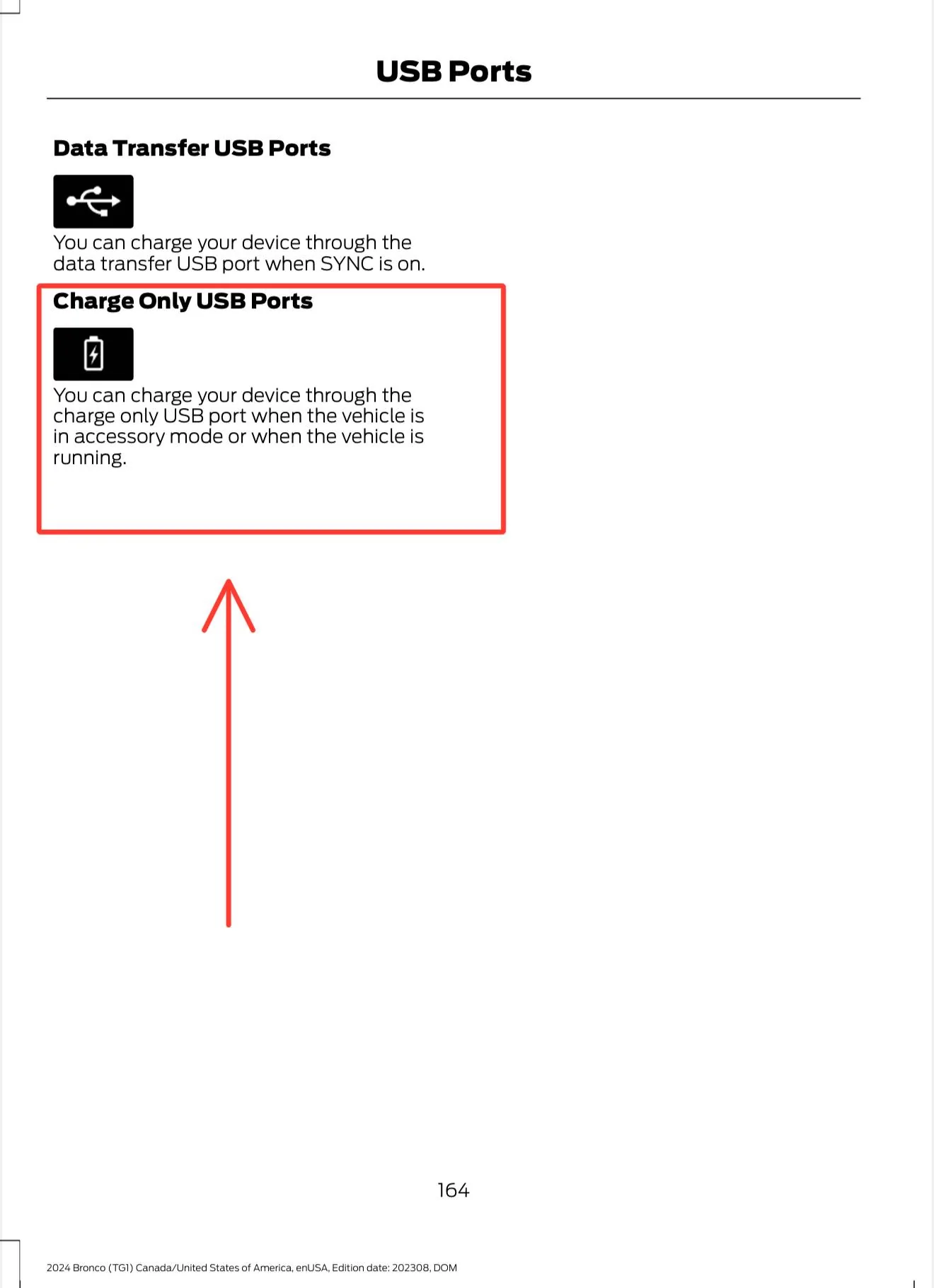
Option 2 was to run a USB cable to the USB power port at the base of the back of the center console. According to the manual (see pic below), this should supply power while the vehicle is in accessory mode or while it’s running. My problem is it seems to run “constant hot,” supplying power even with the truck is completely powered down.

Option 3 is to run the fans to an Aux switch, which I don’t want to occupy for such a temporary accessory.

Anyone know if these outlets (12V and USB ports) should run constant hot? Or do they eventually timeout when battery protection kicks in (which means the fans could stay on for up to 30 minutes draining the battery, however low the draw may be)?

Ford Bronco USB Port Accessory Power Timeout IMG_0141
Sponsored


Johnny Mo

Raptor
Well-Known Member
First Name
John
Joined
Aug 13, 2020
Threads
23
Messages
2,559
Reaction score
4,998
Location
Westchester County, NY
Website
teachu2shoot.com
Vehicle(s)
M-B GLE53 AMG, Ducati XDiavel, Jeep WK GC x3
Your Bronco Model
Raptor
Clubs
 
They eventually time out and can be adjusted via Forscan. I use the 12v outlet in back for my ARB Compressor IGN trigger power, but I also did not want it running for 30-45 minutes after the car was shut off, I adjusted the timeout in Forscan to around 1-2 min or so. The setting value is listed in seconds.
 

V1Rotate

Wildtrak
Well-Known Member
First Name
Bryan
Joined
Oct 18, 2022
Threads
9
Messages
931
Reaction score
2,305
Location
Brevard, NC
Vehicle(s)
2022 Wildtrak
Your Bronco Model
Wildtrak
Clubs
 
They eventually time out and can be adjusted via Forscan. I use the 12v outlet in back for my ARB Compressor IGN trigger power, but I also did not want it running for 30-45 minutes after the car was shut off, I adjusted the timeout in Forscan to around 1-2 min or so. The setting value is listed in seconds.
If you go into the BdyCM on the plain english side of forscan (not the numerical "as built" side of things) there is a setting you can change called "power point feature". If you change that from the old value of "Enable" to "Disable" then it should prevent at least your rear cargo 12v from ever going cold.. works great for me anyway. Obviously would need to make sure anything you tap into that power would then be switched such that it doesn't draw power continuously.

Caveat: mine's not a Raptor but i dont think it matters in this instance
 
OP
OP
Braptor787

Braptor787

Raptor
Active Member
First Name
Jay
Joined
Sep 13, 2024
Threads
6
Messages
32
Reaction score
33
Location
SoCal
Vehicle(s)
2024 Bronco Raptor
Your Bronco Model
Raptor
They eventually time out and can be adjusted via Forscan. I use the 12v outlet in back for my ARB Compressor IGN trigger power, but I also did not want it running for 30-45 minutes after the car was shut off, I adjusted the timeout in Forscan to around 1-2 min or so. The setting value is listed in seconds.
Great to hear there are ways around it. “There’s always a way!”

As a Ford newbie, two questions:

1) Do FORScan adjustments void warranty since its meddling with factory values? I understand you can backup stock profiles but I’ve experienced other manufacturers be able to detect alterations, even after reverting to stock (event logs) and refusing any warranties thereafter. I actually had to buy a second ECU to get around this. There’s always a way :devil:

2) I assume I need this in addition to a Windows-based computer. How/where do I obtain the FORScan software?

Thanks for the advice!
 

Brian_B

Big Bend
Well-Known Member
First Name
Brian
Joined
Sep 14, 2023
Threads
60
Messages
8,247
Reaction score
14,599
Location
Central CA
Vehicle(s)
'23 BB 4dr 7MT, '22 BSport OBX, '87 B-II XL
Your Bronco Model
Big Bend
Clubs
 
For Q1 - not any more than any other modification you would do to your vehicle - your modification has to be the cause of the failure for it to be denied coverage. If you brick a module and they have to reprogram/replace it, then yeah you would have to pay. But if your brakes go bad, they can't deny you because you turned on Bambi lights.

For Q2 - yes, you need an adapter, but not all adapters work, so you need to do a bit of research on it (I think the one you have it ok, but I would double check). If you google Forscan, you can find their web site easily, and they have a forum that has download info, usage, compatible adapters, horror stories, and everything else. It's free use for a month of so, longer use requires a pretty humble license fee.

https://forscan.org/home.html

There is an ioS version, but it's monitoring only. You need the Windows x86/x64 version (with a compatible adapter) to make changes. People have had limited success running it on Macintosh, but only via emulation/VMs on Windows - same with ARM Windows laptops.
 

Sponsored

Johnny Mo

Raptor
Well-Known Member
First Name
John
Joined
Aug 13, 2020
Threads
23
Messages
2,559
Reaction score
4,998
Location
Westchester County, NY
Website
teachu2shoot.com
Vehicle(s)
M-B GLE53 AMG, Ducati XDiavel, Jeep WK GC x3
Your Bronco Model
Raptor
Clubs
 
Great to hear there are ways around it. “There’s always a way!”

As a Ford newbie, two questions:

1) Do FORScan adjustments void warranty since its meddling with factory values? I understand you can backup stock profiles but I’ve experienced other manufacturers be able to detect alterations, even after reverting to stock (event logs) and refusing any warranties thereafter. I actually had to buy a second ECU to get around this. There’s always a way :devil:

2) I assume I need this in addition to a Windows-based computer. How/where do I obtain the FORScan software?

Thanks for the advice!
Don't even mess with the BT versions - I used this also to update the Telematics module on my Fusion and completely re-flashed a ford escape telematics module to work with the fusion.

https://www.amazon.com/OBDLink-EX-FORScan-OBD-Adapter/dp/B081VQVD3F?ref_=ast_sto_dp
 
OP
OP
Braptor787

Braptor787

Raptor
Active Member
First Name
Jay
Joined
Sep 13, 2024
Threads
6
Messages
32
Reaction score
33
Location
SoCal
Vehicle(s)
2024 Bronco Raptor
Your Bronco Model
Raptor
For Q1 - not any more than any other modification you would do to your vehicle - your modification has to be the cause of the failure for it to be denied coverage. If you brick a module and they have to reprogram/replace it, then yeah you would have to pay. But if your brakes go bad, they can't deny you because you turned on Bambi lights.

For Q2 - yes, you need an adapter, but not all adapters work, so you need to do a bit of research on it (I think the one you have it ok, but I would double check). If you google Forscan, you can find their web site easily, and they have a forum that has download info, usage, compatible adapters, horror stories, and everything else. It's free use for a month of so, longer use requires a pretty humble license fee.

https://forscan.org/home.html

There is an ioS version, but it's monitoring only. You need the Windows x86/x64 version (with a compatible adapter) to make changes. People have had limited success running it on Macintosh, but only via emulation/VMs on Windows - same with ARM Windows laptops.
Great info. Thanks!
 
OP
OP
Braptor787

Braptor787

Raptor
Active Member
First Name
Jay
Joined
Sep 13, 2024
Threads
6
Messages
32
Reaction score
33
Location
SoCal
Vehicle(s)
2024 Bronco Raptor
Your Bronco Model
Raptor

sean-florida

Big Bend
Well-Known Member
Joined
Jul 13, 2020
Threads
9
Messages
113
Reaction score
221
Location
FL
Vehicle(s)
SUV
Your Bronco Model
Big Bend
I noticed today that the USB C and USB A ports below the dash turn off about a minute after the car turns off but the 2 USB C ports and lighter ports in the center console seem to never turn off (I checked after an hour and my dash camera was still on).


Is this also an option in the config that can be changed with Forscan?
 

Brian_B

Big Bend
Well-Known Member
First Name
Brian
Joined
Sep 14, 2023
Threads
60
Messages
8,247
Reaction score
14,599
Location
Central CA
Vehicle(s)
'23 BB 4dr 7MT, '22 BSport OBX, '87 B-II XL
Your Bronco Model
Big Bend
Clubs
 
I noticed today that the USB C and USB A ports below the dash turn off about a minute after the car turns off but the 2 USB C ports and lighter ports in the center console seem to never turn off (I checked after an hour and my dash camera was still on).


Is this also an option in the config that can be changed with Forscan?
I thought the ones under the dash go with the radio and the others (center console / back seat / cargo area) go with the Power Point setting
 

Sponsored

Fazetronics

Outer Banks
New Member
Joined
Jan 19, 2025
Threads
2
Messages
4
Reaction score
4
Location
Orlando, FL
Vehicle(s)
2024 Bronco
Your Bronco Model
Outer Banks
I noticed today that the USB C and USB A ports below the dash turn off about a minute after the car turns off but the 2 USB C ports and lighter ports in the center console seem to never turn off (I checked after an hour and my dash camera was still on).


Is this also an option in the config that can be changed with Forscan?
Hey, noticed the same thing on my 2024 outer banks. The two USB-C port up on top of the dash by the windshield seem to never turn off, after hours of waiting to test it out.
Any way to customize that?
 

Ape Factory

Raptor
Well-Known Member
First Name
Michel
Joined
Nov 17, 2024
Threads
13
Messages
491
Reaction score
488
Location
Texas
Vehicle(s)
Audi RS5/Ford F150/Infiniti QX70S
Your Bronco Model
Raptor
Clubs
 
My dash USB's turn off in about 45 minutes or so. I power my radar detector off of one of those and it's never on when I get back in the car an hour later. Haven't really tested the USB ports below the stereo but I think mine turn off right away.
 

Brian_B

Big Bend
Well-Known Member
First Name
Brian
Joined
Sep 14, 2023
Threads
60
Messages
8,247
Reaction score
14,599
Location
Central CA
Vehicle(s)
'23 BB 4dr 7MT, '22 BSport OBX, '87 B-II XL
Your Bronco Model
Big Bend
Clubs
 
Hey, noticed the same thing on my 2024 outer banks. The two USB-C port up on top of the dash by the windshield seem to never turn off, after hours of waiting to test it out.
Any way to customize that?
The two under the dash are run by Sync and they are the USB inputs for CarPlay/Android Auto.

The ones in the center console(both inside the console and for the rear seats) I believe shares the lower point timeout with the power inverter and rear power point. That timeout is configurable in Forscan. Factory vehicles have various settings for that, I’ve heard of anywhere from 10 minutes to an hour, but it can be extended to 24 hrs

For the top of the dash - not sure which, but I’d guess Power Point and not hooked up to Sync
Sponsored


Top