


- First Name
- Don
- Joined
- Feb 27, 2026
- Threads
- 5
- Messages
- 52
- Reaction score
- 73
- Location
- 32.50722N x 110.92533W
- Vehicle(s)
- 2026 Raptor Avalanche
- Your Bronco Model
- Raptor
- Thread starter
- #1
I went down a rabbit hole shortly after find that my dash cam would not work on my 2026 Raptor as it does not have a auto-dimming function and I prefer using the rearview mirror/monitor for a clear full view.
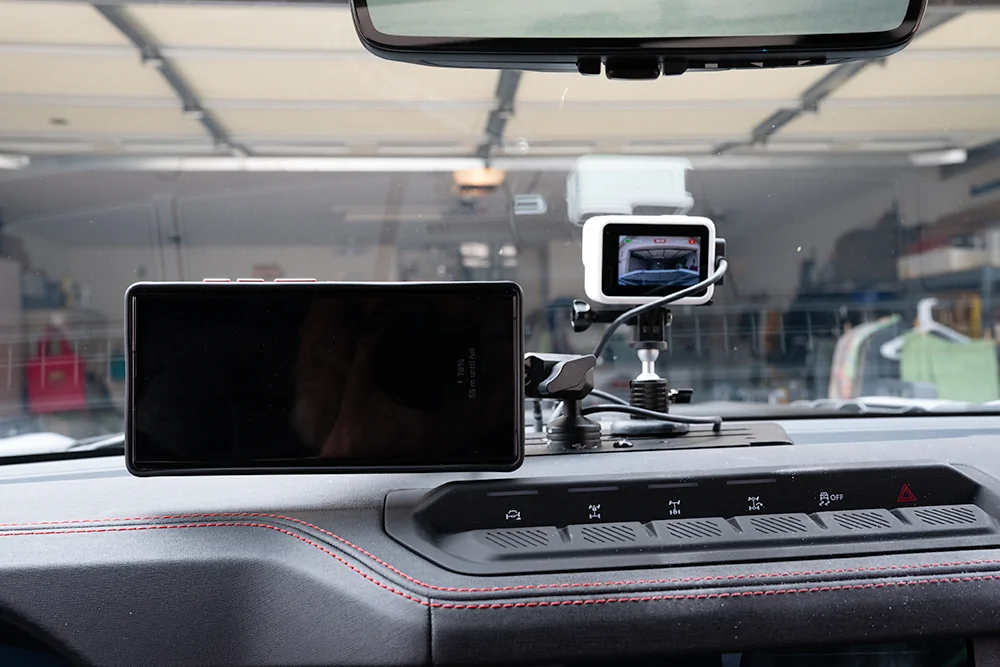
I found out the both DJI & GoPro camera can be used as dash cams and quickly searched which one would be better and found the GoPro better suited for my needs. The reasons are simple; I can loop the videos (DJI has same feature), the GoPro can be set up to run without the battery (more on that later), the GoPro has a magnetic power door for quick power release. I also found a magnetic stand for the dash mount.
Amazon had everything I needed:
Magnetic Camera Mount for GoPro ($9.99)
DV8 Offroad Digital Device Mount (106.69)
GoPro Hero13 picked up a white case thinking less heat ($380)
GoPro Magnetic power door ($100)
I also have been using a magnetic wireless phone charger that had been connected to the accessory dash mount.
There are other dash mounts out there that will work equally as well but done that I could get as quickly as from Amazon. I also need one that would fit and work with the twin power port on the dash.
The DV8 mount is stupid simple to install (to a point), one screw in the dash mount. My issue came when I attempted to mount my phone charger as the mounting bolt was too large to fit the smaller 10/24 (8) PEM nut mounting hole. The simple solution was enlarging the hole I wanted and thread the bolt through the hole and placed a locking nut. The bolt was slightly too long and ended up cutting about ¼” off for a perfect fit.
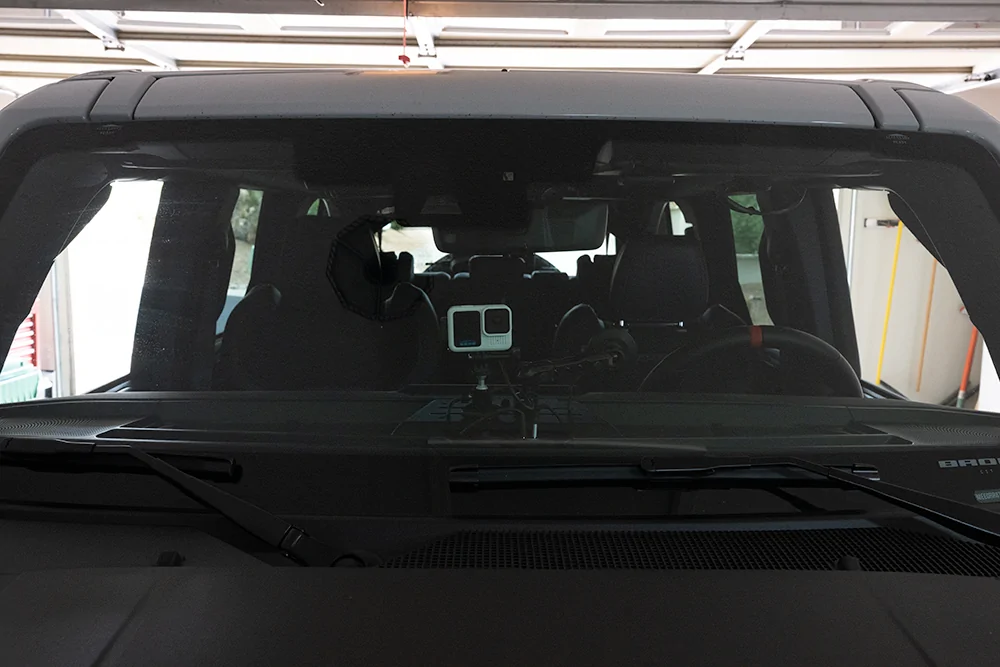
The GoPro with the magnetic mount fit equally as good.
GoPro setup for dash mounting without battery:
I learned all this from watching YouTube.
Set the GoPro in looping mode: Using a GoPro as a DashCam? (HERO13 BLACK) - YouTube
Setting up GoPro to run without battery: How to Fix GO PRO's Not Enough Power Message
I now have my phone and dash cam mounted and running.

I found out the both DJI & GoPro camera can be used as dash cams and quickly searched which one would be better and found the GoPro better suited for my needs. The reasons are simple; I can loop the videos (DJI has same feature), the GoPro can be set up to run without the battery (more on that later), the GoPro has a magnetic power door for quick power release. I also found a magnetic stand for the dash mount.
Amazon had everything I needed:
Magnetic Camera Mount for GoPro ($9.99)
DV8 Offroad Digital Device Mount (106.69)
GoPro Hero13 picked up a white case thinking less heat ($380)
GoPro Magnetic power door ($100)
I also have been using a magnetic wireless phone charger that had been connected to the accessory dash mount.
There are other dash mounts out there that will work equally as well but done that I could get as quickly as from Amazon. I also need one that would fit and work with the twin power port on the dash.
The DV8 mount is stupid simple to install (to a point), one screw in the dash mount. My issue came when I attempted to mount my phone charger as the mounting bolt was too large to fit the smaller 10/24 (8) PEM nut mounting hole. The simple solution was enlarging the hole I wanted and thread the bolt through the hole and placed a locking nut. The bolt was slightly too long and ended up cutting about ¼” off for a perfect fit.
The GoPro with the magnetic mount fit equally as good.
GoPro setup for dash mounting without battery:
I learned all this from watching YouTube.
Set the GoPro in looping mode: Using a GoPro as a DashCam? (HERO13 BLACK) - YouTube
Setting up GoPro to run without battery: How to Fix GO PRO's Not Enough Power Message
I now have my phone and dash cam mounted and running.
Sponsored


