Sponsored

Hobbes

Badlands
Well-Known Member
First Name
Steve
Joined
Mar 7, 2022
Threads
9
Messages
73
Reaction score
194
Location
Indiana
Vehicle(s)
Audi S3
Your Bronco Model
Badlands
Clubs
 
Successful changes made:

Double honk
Seatbelt chime
Door ajar chime
Disable auto S/S
Global window open/close
Bambi mode
Added Rock Crawl GOAT mode
Raised steering wheel temp
I also have a 2022. Where can I find FORscan directions for raising the steering wheel temp? I can't find them.
THanks.
Sponsored

 

BLafferty

Wildtrak
Member
First Name
Brian
Joined
Aug 7, 2021
Threads
2
Messages
19
Reaction score
69
Location
VA
Vehicle(s)
22 Chevy Black Widow, 22 Bronco WildTrak
Your Bronco Model
Wildtrak
I also have a 2022. Where can I find FORscan directions for raising the steering wheel temp? I can't find them.
THanks.
I believe it was either in the BCM or the SCCM. Go to the "as-built" module and look for steering wheel temp. You should be able to change the number there.
 

23OBX2.7

Outer Banks
Well-Known Member
First Name
2.7
Joined
Sep 3, 2025
Threads
38
Messages
2,244
Reaction score
1,192
Location
AB Canada
Vehicle(s)
2023 Bronco
Your Bronco Model
Outer Banks
I believe it was either in the BCM or the SCCM. Go to the "as-built" module and look for steering wheel temp. You should be able to change the number there.
I increased mine coup,e weeks ago....not sure notice much difference...
 

SlowTrak

Wildtrak
Well-Known Member
Joined
Jul 31, 2025
Threads
6
Messages
82
Reaction score
48
Location
NorCal
Vehicle(s)
It's an SUV btw....
Your Bronco Model
Wildtrak
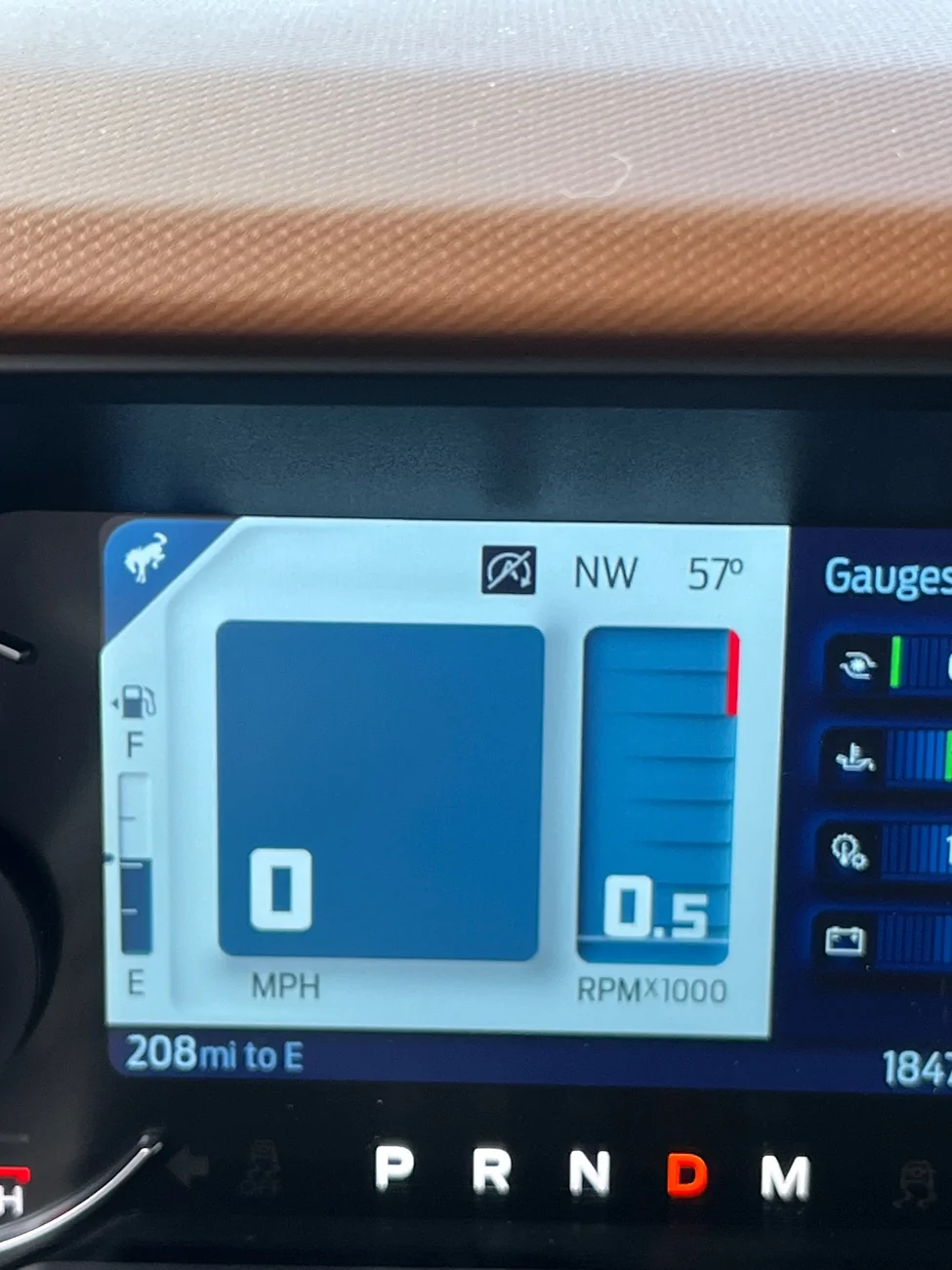
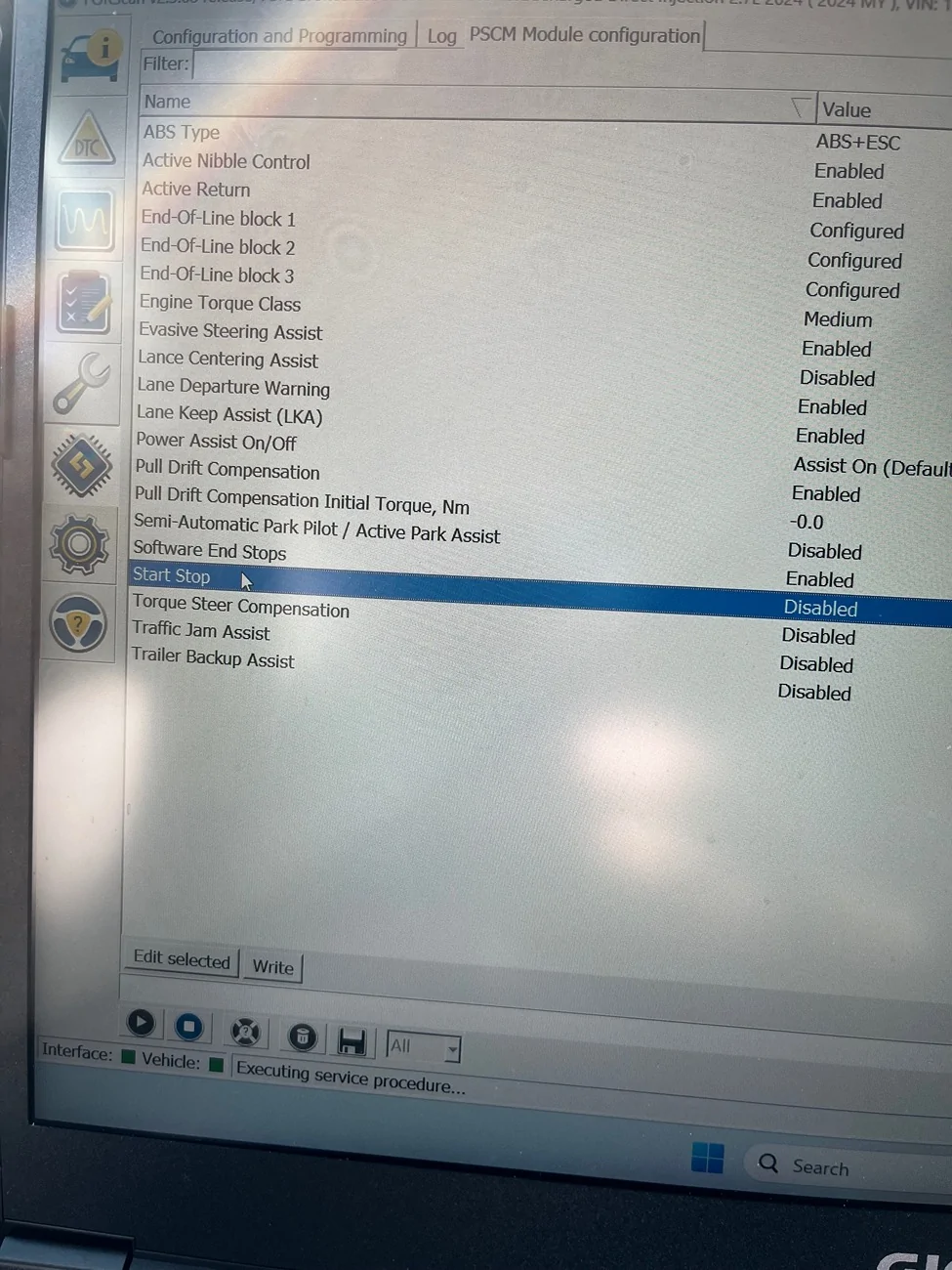
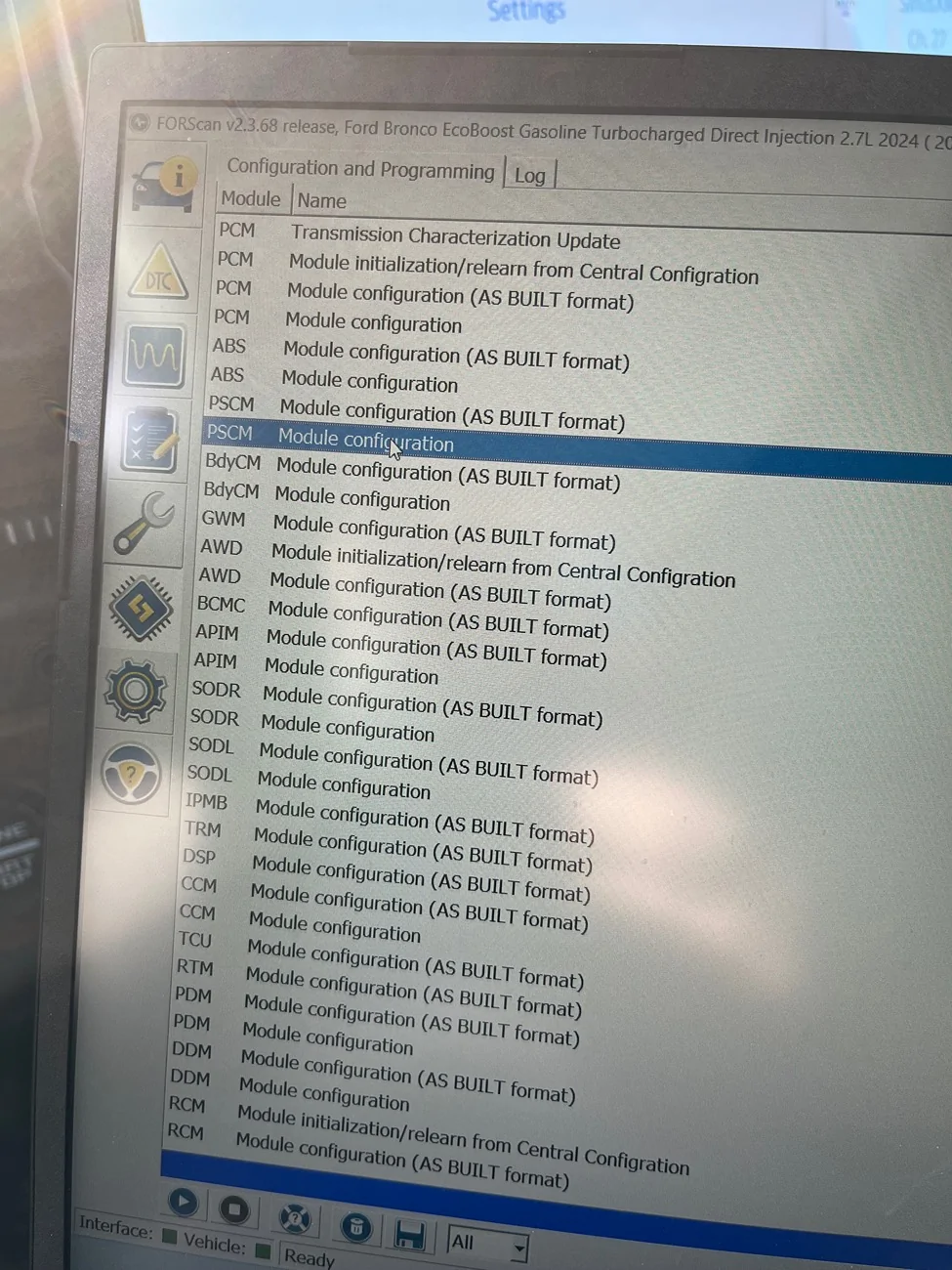
Pretty slick program!!! Can absolutely see how the inexperienced could totally mess up their cars with it by mistake! Thankfully I avoided that. I was able to eliminate start/stop, double honk, fake engine noise, which were my main items. I noticed “chime” for blind spot was disabled, so I enabled it, but not sure if it’ll do anything…

On the start/stop, here is how I did it, and what it looks like afterwards. I get the symbol on the dash saying it's in stop mode when at a stop, but it's not stopped.

IMG_7151.webp


IMG_7150.webp


IMG_7153.webp


IMG_7152.webp
I think start stop is also in the BdyCM (don't quote me on this, just going off bad memory haha). Try disabling both. I have a 2024 also but I had purchased the 4DTech plug in that I had on my 2022 so I didnt change the settings in Forscan. Didn't want to pull everything off just to play with it and plug everything back in.
 

Nc211

Outer Banks
Well-Known Member
Joined
Dec 16, 2023
Threads
47
Messages
730
Reaction score
1,412
Location
Washington DC
Vehicle(s)
24 OBX, 20 GLS 450, 14 VW Tiquan
Your Bronco Model
Outer Banks
I think start stop is also in the BdyCM (don't quote me on this, just going off bad memory haha). Try disabling both. I have a 2024 also but I had purchased the 4DTech plug in that I had on my 2022 so I didnt change the settings in Forscan. Didn't want to pull everything off just to play with it and plug everything back in.
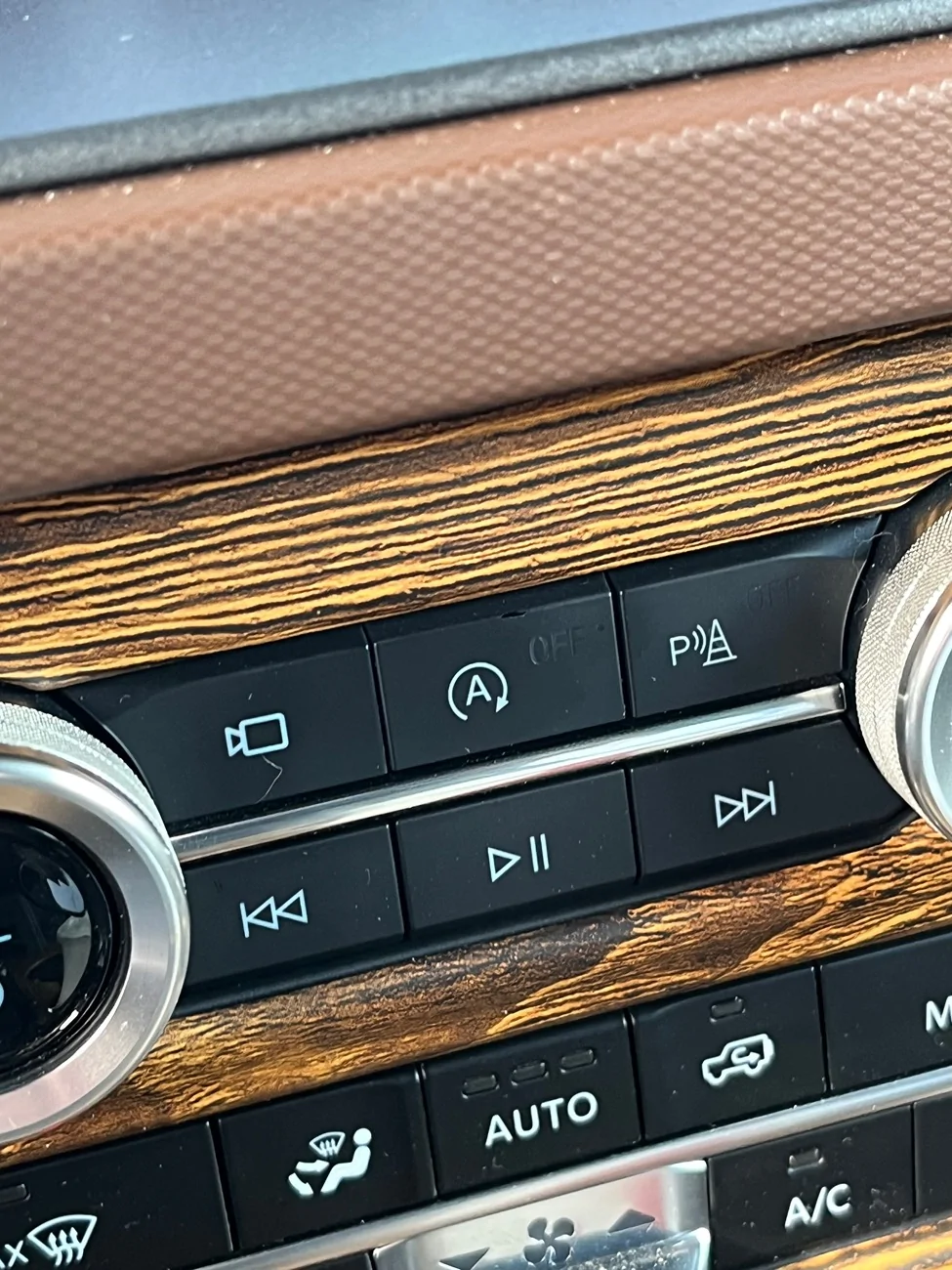
Thanks! I actually returned the setting back to active that I had tried to disable it with. Ford's made it so easy to turn it off with the button, my fingers now have muscle memory whenever I get in the car to drive it. I always check the camera button to make sure I"m not about to run over any packages at my garage door (I back the car into the garage), hit the ASS button, and then put it into drive. Very natural process.
 

Sponsored

ssitruc

Badlands
Member
Joined
Feb 7, 2026
Threads
0
Messages
12
Reaction score
6
Location
Oklahoma
Vehicle(s)
'25 Bronco Badlands
Your Bronco Model
Badlands
Thank you guys! I was able to do the mods that I wanted to my 2025 Bronco Badlands (Lux package) Non SAS... using FORScan v2.3.69 (updated to V2.3.70) and OBDLinkEX Cable... worked like a charm. From the spreadsheet on here, did Global Windows Up (already had down) and a single press and hold on the FOB's Lock button for about 3-4 seconds and they now will roll up too (down requires a double press and hold on the Unlock button), also did the Fog Light to work with High Beams, FOB Panic Button changed to 2 clicks, Disabled the Ding Ding Ding when I first get in the Bronco, and disabled the dinging for the front seatbelts using the manual process in the Owner's manual... so it is quiet now when getting in... I also added Sport mode, leaving Eco as is, for now. So it has all eight, with Rock Crawl just not having its name displayed. I had already eliminated the Start/Stop function using a "Stop/Start Eliminator" module the second day I owned it.

Programming was all done thru the "As Built" sections, and all went well, although there were a couple times the dash flashed some warnings/notices up, and a couple times it kicked up some DTC's during/after writing. But after I was done I cleared all DTC's, and I have tested functionality repeatedly... and everything is working as expected and no codes have returned. Also there was a couple times that there were things that appeared strange at first, like the TPMS pressure values where blank, but once driven a little (a mile or so) all was well again (received new data). Also the first time I did the Global Windows Up using the FOB, the passenger window acted erratic (not rolling up and down correctly even using the button inside the Bronco. I just did the manual window reset procedure for that one window and it has worked fine ever since, using the button or the FOB.
So Again Thanks! to all that worked on figuring this stuff out.

I have one question... IF I want to delete Eco mode because 1) I will never use it and 2) to get the label back for Rock Crawl, does anyone know what to modify in the ABS module to do that via the "As Built" format, or is that just done via the enable/disable format?
 
Last edited:

Cordycord

Heritage
Well-Known Member
First Name
Cord
Joined
Sep 22, 2025
Threads
15
Messages
104
Reaction score
227
Location
SoCal
Vehicle(s)
2016 Pilot, 2016 E300, 2005 MSM, 2001 B3500, 2010 Range Rover Sport, 2022 Pilot
Your Bronco Model
Heritage
Is it possible to adjust the DRL brightness similar to the F150?

I have a very slightly tinted windshield (90%) and the headlights click on all the time. My solution is to not use the auto headlights and use the DRL option on the dial but they are significantly less bright than if you use the auto headlights.
I never thought of that. a) I've got windshield tint which may affect the sensor, and b) I do notice that the DRL brightness is lower when automatic is not listed.
 

ClappinCheex369

Black Diamond
Well-Known Member
First Name
Joseph
Joined
Mar 2, 2026
Threads
4
Messages
46
Reaction score
5
Location
Clarksville, TN
Vehicle(s)
2023 Ford Bronco
Your Bronco Model
Black Diamond
Clubs
 
Sorry if dumb question - 100% newbie on the learning curve of Forscan. Main question - first time I set it up and asks me to set the profile for the car (first time connection), is that my back-up to stock? I want to make sure I fully understand how to save a version of the as-built values across the board before I start making a few of the popular changes. I follow 99% of it, thanks to all of you (seriously, thanks guys who have spent the hours doing these videos and data mining and showing us how to do this!!!)

Laptop is all set up, Forscan 2-month license activated, waiting for the adaptor to arrive.

I want to:
1) turn off fake engine noise
2) turn off double horn
3) check heated steering wheel temperature setting

I saw Ragarkon's audio thread and found the entires for the lux / BO system to check (thank you!)

Just want to make sure I understand how to save a file from the very start as back up just in case.
Did you Turn off the fake engine noise? Happen to have the guidelines/numbers for that?
 

CalvinT

Badlands
Well-Known Member
First Name
Calvin
Joined
Mar 15, 2022
Threads
16
Messages
2,442
Reaction score
3,074
Location
Phoenix, AZ
Vehicle(s)
2002 Subaru WRX Wagon, 2023 Badlands (nonSAS)
Your Bronco Model
Badlands
Clubs
 
Thanks to everyone who's contributed to this and other Forescan threads. I finally got around to making changes. I wanted to make them in one or two sessions so I'd only need to license FORSan one time. I had some difficulty getting my Bronco to talk to the OBDII EX adapter. Could have been a problem with my laptop (Win 10).

I made the following changes.
Global close windows,
Added factory subwoofer,
Double honk delete,
Panic alarm two presses,

I thought about adding Sport Mode, but others have reported problems with having eight G.O.A.T. modes. The G.O.A.T. modes worked find, but there were display problems and deleting ECO mode is problematic. Also I have a manual, so Sport Mode woudn't do much for me because of #2, I left ASS alone. It doesn't really bother me, plus the Bronco turns it off in the summer because of A/C.

Anyway, thanks again.
 

CalvinT

Badlands
Well-Known Member
First Name
Calvin
Joined
Mar 15, 2022
Threads
16
Messages
2,442
Reaction score
3,074
Location
Phoenix, AZ
Vehicle(s)
2002 Subaru WRX Wagon, 2023 Badlands (nonSAS)
Your Bronco Model
Badlands
Clubs
 
I just removed ECO mode from mine. I have a manual so it didn't do anything useful.

FYI... ECO mode and Sport mode live at the same address and appear to share a bit. So I'm not sure how compatible they are. Just because something displays doesn't mean it works as Ford intended once you start messing with things.

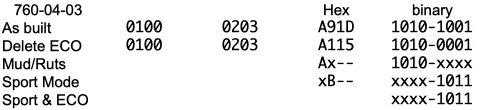
The spreadsheets, and FORScan show data in hexidecimal format. I broke it down to binary to see what was going on at the relevant address. All Badlands Broncos probably have the same As Built settings as I did. You'll see that the bit that gets cleared (set to 0) when removing ECO mode gets set to 1 when adding Sport mode. This may explain problems some are reporting when trying to set all eight G.O.A.T. modes.

The 2026 Badlands come with both ECO mode and Sport mode. I'd like to see the as built settings for 760-04-03 for a 2026. Maybe I'm all wet. Maybe other addresses are involved that aren't documented in FORScan?

I'm only showing the first two letters/numbers. The last two are a check sum that gets set by FORScan so I didn't show the binary values.

1778168176946-wj.webp


edit: I've been thinking a bit more. It could be the true setting for Sport mode without ECO is x3-- (0011) and not xB-- (1011). The B is there because the same address also controls ECO mode. All the other modes seem to need just one bit set to activate them. It would be odd for Sport mode to need two different bits set.
I may explore this later if I get the time.
 
Last edited:

Sponsored

jtim47Bronco

Badlands
Well-Known Member
First Name
Tim
Joined
Oct 1, 2021
Threads
5
Messages
89
Reaction score
96
Location
Federal Way Washington
Vehicle(s)
my 28th new Ford replacing my 2015 F-150 Platinum
Your Bronco Model
Badlands
Clubs
 
Thanks to everyone who's contributed to this and other Forescan threads. I finally got around to making changes. I wanted to make them in one or two sessions so I'd only need to license FORSan one time. I had some difficulty getting my Bronco to talk to the OBDII EX adapter. Could have been a problem with my laptop (Win 10).

I made the following changes.
Global close windows,
Added factory subwoofer,
Double honk delete,
Panic alarm two presses,

I thought about adding Sport Mode, but others have reported problems with having eight G.O.A.T. modes. The G.O.A.T. modes worked find, but there were display problems and deleting ECO mode is problematic. Also I have a manual, so Sport Mode woudn't do much for me because of #2, I left ASS alone. It doesn't really bother me, plus the Bronco turns it off in the summer because of A/C.

Anyway, thanks again.
I am wanting to add sport mode to my 2022 bronco badlands. I heard this would cause warranty problems. anybody out there have warranty problems after changing factory settings?
looking for shop in Seattle area to do this.
 

coupon_ninja

Badlands
Active Member
First Name
Abby
Joined
Sep 24, 2021
Threads
1
Messages
39
Reaction score
118
Location
VA
Vehicle(s)
2017 Ford Mustang GT, 2021 Jeep Rubicon 2D
Your Bronco Model
Badlands
Clubs
 
I am wanting to add sport mode to my 2022 bronco badlands. I heard this would cause warranty problems. anybody out there have warranty problems after changing factory settings?
looking for shop in Seattle area to do this.

I haven’t brought mine in for anything that reasonably related to programming changes, they would need to prove those changes resulted in your complaint. Warranty is not one nebulous being that is erased by one thing. If your a/c goes out they’re not gonna be like “welp, you turned in global up so warranty isn’t covering your compressor!”

You’re going to be hard-pressed to find anyone who will do that for you, though. I have a ‘21 and added sport mode to mine with no probs. It does make a difference (even in a manual) but I find the excess turbo noise irritating after awhile. I would not be surprised if some of that is artificial. The Forscan programmers have added sport mode as a selectable option, no need to go into as built. Not saying it won’t cause problems on other model years, but my standard cluster displays it no problem. If you have any amount of computer comfort, you can buy the cable and start the free license and do it yourself. There’s lots of diagnostics you can run as well for your own info, that don’t make changes to the system.
 

skyhunter

Big Bend
Well-Known Member
Joined
Apr 24, 2024
Threads
7
Messages
123
Reaction score
109
Location
MA
Vehicle(s)
2024 2DR Bronco
Your Bronco Model
Big Bend
Thank you guys! I was able to do the mods ...
I have one question... IF I want to delete Eco mode because 1) I will never use it and 2) to get the label back for Rock Crawl, does anyone know what to modify in the ABS module to do that via the "As Built" format, or is that just done via the enable/disable format?
If you do a lot of highway driving the Eco mode paired with cruise control does way better than me with fuel efficiency than just Eco alone.
 

ssitruc

Badlands
Member
Joined
Feb 7, 2026
Threads
0
Messages
12
Reaction score
6
Location
Oklahoma
Vehicle(s)
'25 Bronco Badlands
Your Bronco Model
Badlands
"If you do a lot of highway driving the Eco mode paired with cruise control does way better than me with fuel efficiency than just Eco alone."

I did a trip for work to the same place twice, a week apart (came home for the weekend), about 530 miles each round trip. Almost all of it was highway/turnpike driving and I'm thinking the speed, and pushing a brick, took away any "advantage", because the difference was 3/10th less with Eco... or practically the same. Also where I live wind is always a factor, as it's always present, but both trips were in similar conditions. It may have had more to do with the speed, cruise was set on 70-80mph for just about all of the trips, and somewhere around 70mph MPG it starts taking a noticeable hit, regardless of mode... it would be interesting to try it with cruise set to 65mph, but then I'd get ran over or have a parade behind me :crackup:

FWIW, I got rid of Eco Mode using the "Easy" way (??), choosing disable in the Non As Built module, back in March. The dash display went back to displaying all of the modes normally when toggling thru them, now it just has Sport instead of Eco. I've tried each mode at least a couple times each since, and have checked for codes periodically (none). Also, even when I had all 8 enabled, they all functioned correctly, and it did not kick any codes. The only thing different was the last one, Rock Crawl, got a generic looking picture and no title when going to that mode, and by going back to 7 Rock Crawl got it's title back and it's original picture.
 
Last edited:

Mr Nick

Outer Banks
Member
First Name
Nick
Joined
May 10, 2026
Threads
4
Messages
22
Reaction score
56
Location
Chicagoland
Vehicle(s)
2026 OBX SAS, 1969 Olds Cutlass
Your Bronco Model
Outer Banks
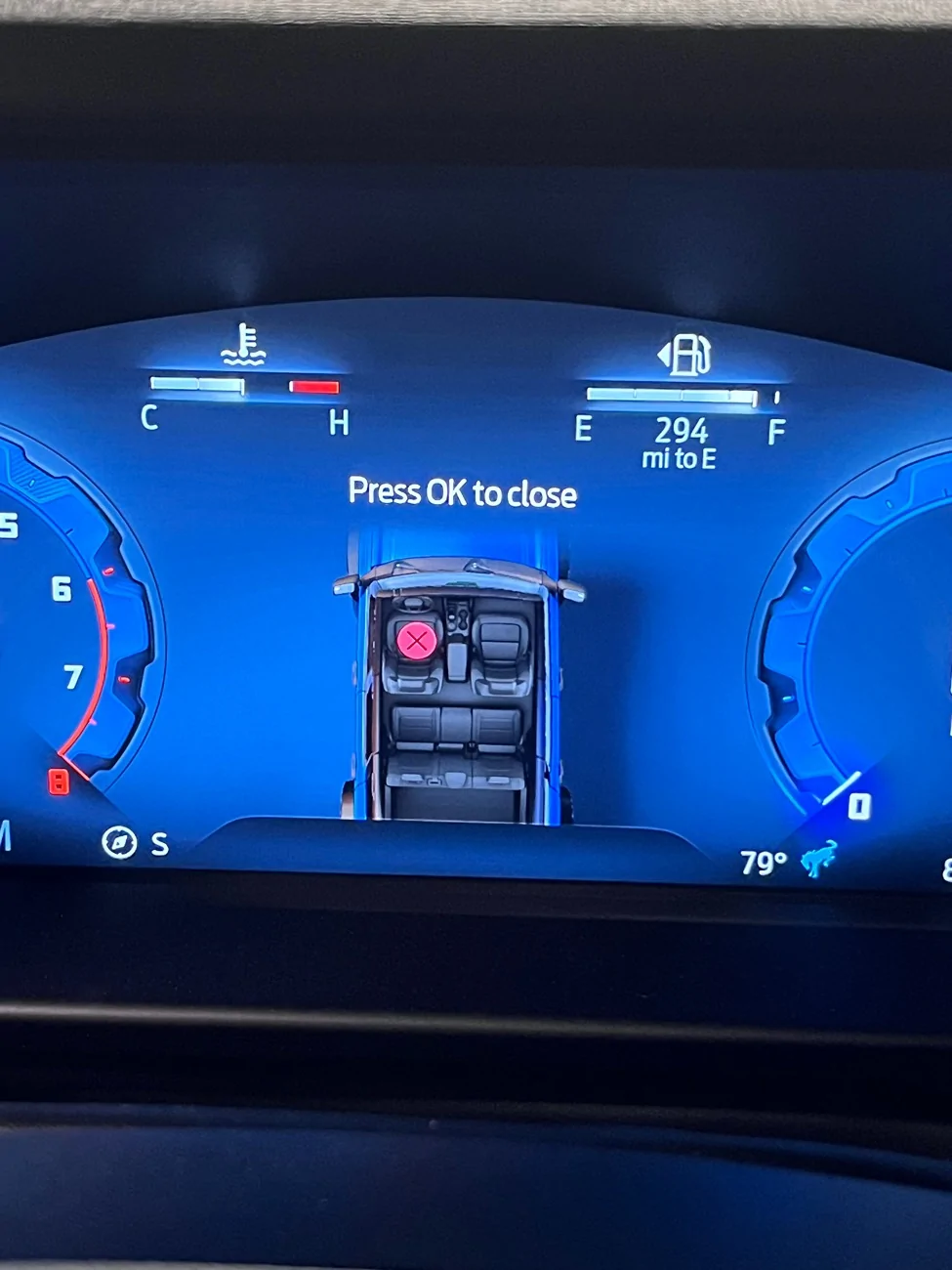
I've eliminated the seatbelt and door chimes, but I don't see anything in the plain English enable/disable options to remove this pop up? Anybody know if it's possible, and if so... how? I'm not opposed to doing As Built.

Ford Bronco 2021+ Bronco ForScan Thread IMG_6040
Sponsored


Top