
Sponsored

Unwanted split screen on 12 inch display.

VirginiaHeritage

Heritage
Well-Known Member
First Name
Frank
Joined
Apr 6, 2025
Threads
36
Messages
1,040
Reaction score
2,619
Location
Virginia
Vehicle(s)
‘25 Bronco HE
Your Bronco Model
Heritage
Clubs
 
I’ll start by saying I could probably read the manual and figure this out eventually but I’m trying the easy button here first:

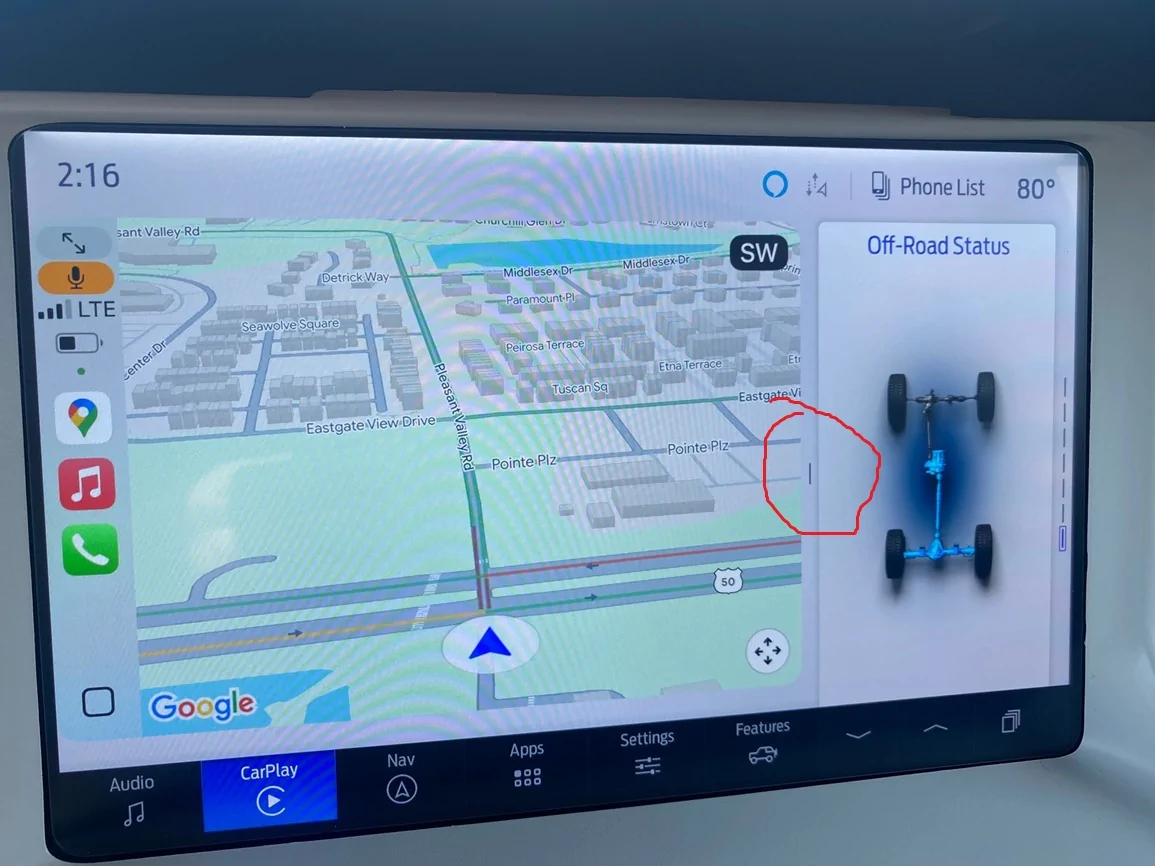
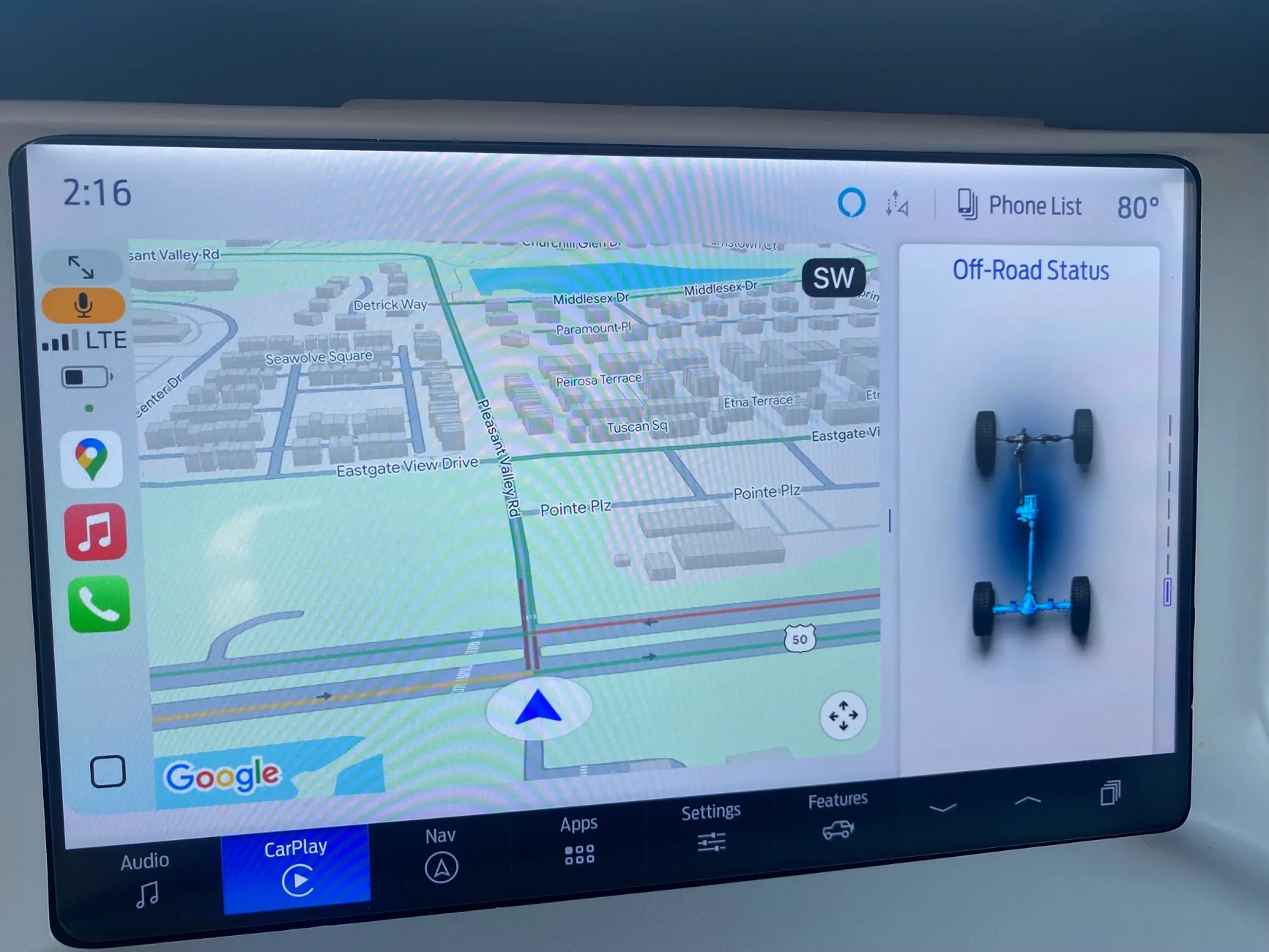
When using Carplay with Google Maps, I can never get the map to fill the whole screen. There is always another section to the right that is not Carplay and can be toggled between various things (phone, audio track, 4WD mode, pitch/roll, etc) with up and down arrows below it but I can’t figure out how to get rid of the damned thing.

Even more annoying is that this doesn’t happen when my wife’s phone is connected. Her Google maps can fill the screen. No sidebar. We both have iPhones running iOS 18.xx and use Carplay. Her phone is a newer model but I doubt that’s relevant.

So what the hell? Where is this setting that allows the Bronco to reserve screen space for itself with my phone but not hers?


Ford Bronco Unwanted split screen on 12 inch display. IMG_3125
Sponsored

 
Last edited:

PWillette

Badlands
Well-Known Member
First Name
Parrie
Joined
Dec 28, 2020
Threads
44
Messages
3,549
Reaction score
6,106
Location
Maine
Vehicle(s)
'08 F250 Super Duty, '01 SS Camaro, '21 Bronco
Your Bronco Model
Badlands
Following. I have similar issue w/ my android phone...some days I get the full screen, some days it splits the screen with my trip dialogue box.
 

GoHawks63

Wildtrak
Well-Known Member
First Name
George
Joined
Jan 17, 2025
Threads
16
Messages
687
Reaction score
1,014
Location
Metro Detroit
Vehicle(s)
Bronco Wildtrak, Cadillac CTS-V Coupe, Roush Stage 3 Mustang convertible
Your Bronco Model
Wildtrak
Do you see that small line between the two frames? put your finger on it and swipe right.
Ford Bronco Unwanted split screen on 12 inch display. ma
 

GoHawks63

Wildtrak
Well-Known Member
First Name
George
Joined
Jan 17, 2025
Threads
16
Messages
687
Reaction score
1,014
Location
Metro Detroit
Vehicle(s)
Bronco Wildtrak, Cadillac CTS-V Coupe, Roush Stage 3 Mustang convertible
Your Bronco Model
Wildtrak
Nix what I just posted. I just went in my 2024 WildTrak and that line I circled in your picture is an arrow (pointing left) on my screen. What @HeliPilot posted is correct and will get you the full screen.

I have mine set up with the map on the left side of the screen and the audio on the right. When I press on that arrow it gives me a full screen of the audio, or probably whatever you have on the smaller right side screen.
 

Sponsored

GoHawks63

Wildtrak
Well-Known Member
First Name
George
Joined
Jan 17, 2025
Threads
16
Messages
687
Reaction score
1,014
Location
Metro Detroit
Vehicle(s)
Bronco Wildtrak, Cadillac CTS-V Coupe, Roush Stage 3 Mustang convertible
Your Bronco Model
Wildtrak
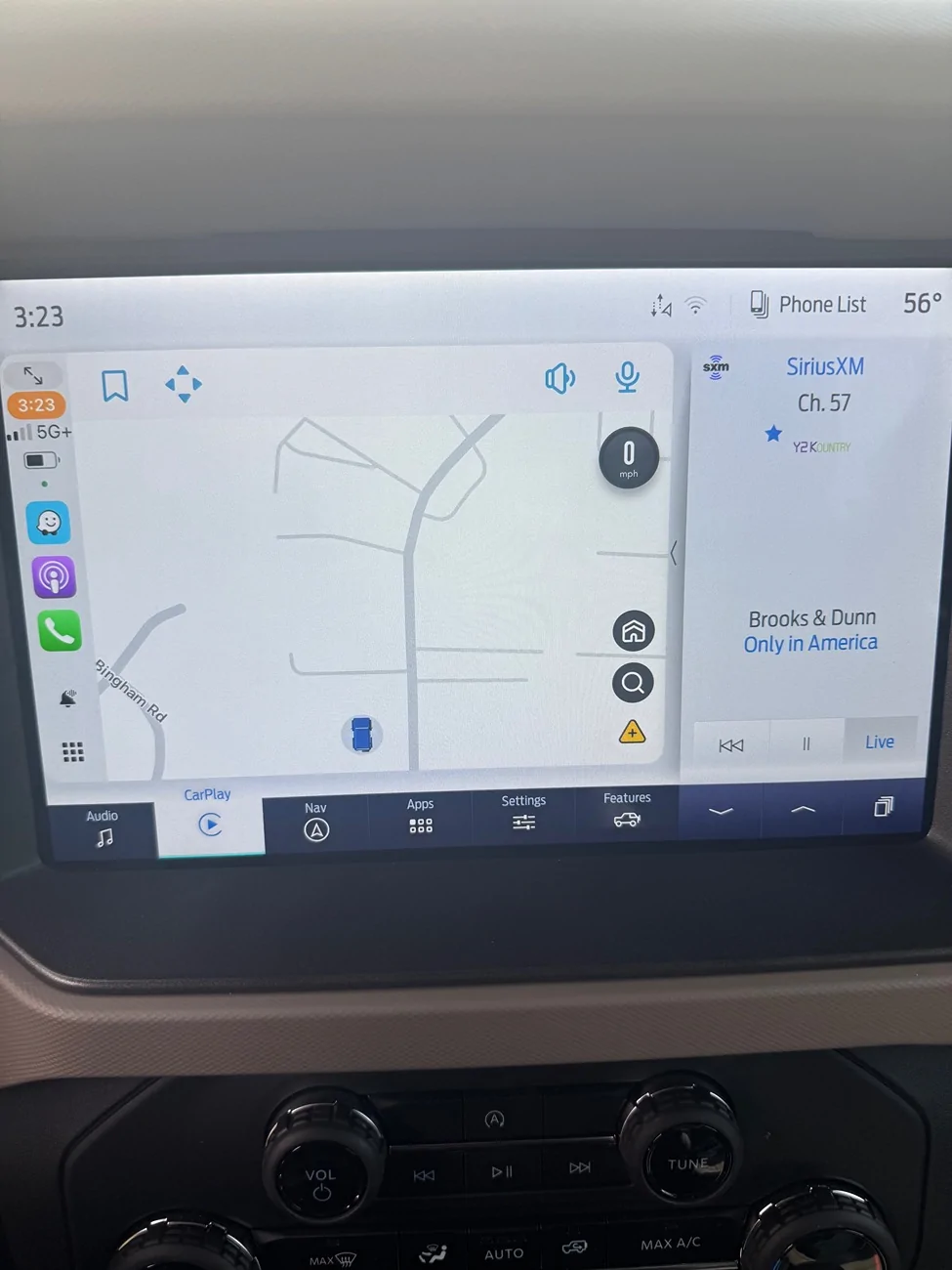
For reference. This is what my screen looks like.


Edit: I played around a bit more. Apparently when you have the audio (radio, SAT Radio or your phone) on the right side, there is an arrow. For other functions, the like is there and allows you to swipe left in order to put whatever you have on the right side of the screen into the whole screen.

Ford Bronco Unwanted split screen on 12 inch display. IMG_5136
 
Last edited:
OP
OP
VirginiaHeritage

VirginiaHeritage

Heritage
Well-Known Member
First Name
Frank
Joined
Apr 6, 2025
Threads
36
Messages
1,040
Reaction score
2,619
Location
Virginia
Vehicle(s)
‘25 Bronco HE
Your Bronco Model
Heritage
Clubs
 
The arrows just below the clock in the top left of the screen is the full screen button.
Of course it was right under my nose. Thank you!!
 
OP
OP
VirginiaHeritage

VirginiaHeritage

Heritage
Well-Known Member
First Name
Frank
Joined
Apr 6, 2025
Threads
36
Messages
1,040
Reaction score
2,619
Location
Virginia
Vehicle(s)
‘25 Bronco HE
Your Bronco Model
Heritage
Clubs
 
Nix what I just posted. I just went in my 2024 WildTrak and that line I circled in your picture is an arrow (pointing left) on my screen. What @HeliPilot posted is correct and will get you the full screen.

I have mine set up with the map on the left side of the screen and the audio on the right. When I press on that arrow it gives me a full screen of the audio, or probably whatever you have on the smaller right side screen.
Apparently it’s an arrow when pulling things from Carplay. It’s a line if you toggle that side panel down to Bronco displays. But yeah I had already swiped that more than a ho on Tinder.

@HeliPilot had it right. Thanks, all
 

Sponsored
OP
OP
VirginiaHeritage

VirginiaHeritage

Heritage
Well-Known Member
First Name
Frank
Joined
Apr 6, 2025
Threads
36
Messages
1,040
Reaction score
2,619
Location
Virginia
Vehicle(s)
‘25 Bronco HE
Your Bronco Model
Heritage
Clubs
 
It’s worth mentioning that I have been using Carplay since 2018 and this is the first time I’ve had to do this. In the Colorado, the Silverado work trucks, and the Subaru, Carplay always defaults to full screen. You can split the screens within Carplay, but thats all there is. The little arrows under the clock aren’t there. Those vehicles all have much smaller screens. Maybe the Bronco is the first one with a screen big enough for something else to share the screen. Maybe it’s the Ford software. I’m just glad it’s figured out so I can stop swearing at the screen. 🙂
 

mcinfantry

Badlands
Well-Known Member
First Name
Lee
Joined
Jun 2, 2021
Threads
35
Messages
2,411
Reaction score
3,955
Location
Louisiana
Vehicle(s)
Badlands 2 door
Your Bronco Model
Badlands
Clubs
 
I like the widgets on the screen. I use HomeKit, clock, calendar, FordPass…
 

Beggsie

Badlands
Well-Known Member
First Name
Michael
Joined
Jan 26, 2025
Threads
6
Messages
114
Reaction score
131
Location
California
Vehicle(s)
2024 Bronco
Your Bronco Model
Badlands
I’ll start by saying I could probably read the manual and figure this out eventually but I’m trying the easy button here first:

When using Carplay with Google Maps, I can never get the map to fill the whole screen. There is always another section to the right that is not Carplay and can be toggled between various things (phone, audio track, 4WD mode, pitch/roll, etc) with up and down arrows below it but I can’t figure out how to get rid of the damned thing.

Even more annoying is that this doesn’t happen when my wife’s phone is connected. Her Google maps can fill the screen. No sidebar. We both have iPhones running iOS 18.xx and use Carplay. Her phone is a newer model but I doubt that’s relevant.

So what the hell? Where is this setting that allows the Bronco to reserve screen space for itself with my phone but not hers?

IMG_3125.jpeg
I'm laughing so hard. My wife's phone was setup second to mine, but every time she rides with me, the damn screen wants to connect to her phone and settings over mine! Guess my Bronco is a boy - likes her better 😆
 

Pipper99

Badlands
Well-Known Member
First Name
Terry
Joined
Sep 17, 2020
Threads
0
Messages
95
Reaction score
74
Location
Fort Worth, Texas
Vehicle(s)
2024 Ford Bronco
Your Bronco Model
Badlands
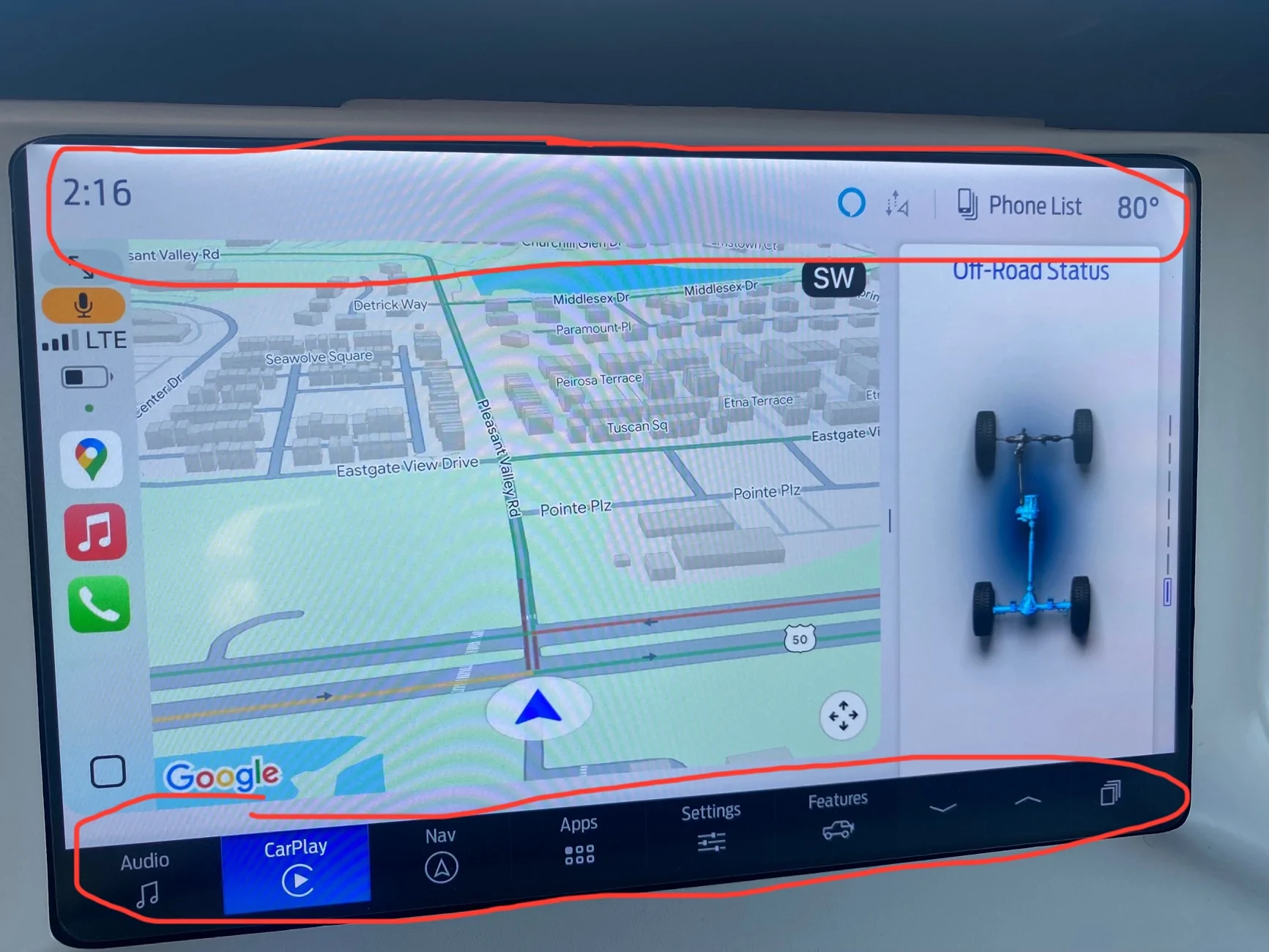
Since Ford finally gave us the option to make the sidebar disappear, I’d love to see the option to make the top and bottom bars disappear and reappear at the tap of an onscreen button, so the map can fill even more of the screen.

Ford Bronco Unwanted split screen on 12 inch display. IMG_2627
 
OP
OP
VirginiaHeritage

VirginiaHeritage

Heritage
Well-Known Member
First Name
Frank
Joined
Apr 6, 2025
Threads
36
Messages
1,040
Reaction score
2,619
Location
Virginia
Vehicle(s)
‘25 Bronco HE
Your Bronco Model
Heritage
Clubs
 
I'm laughing so hard. My wife's phone was setup second to mine, but every time she rides with me, the damn screen wants to connect to her phone and settings over mine! Guess my Bronco is a boy - likes her better 😆
Dude, ditto. I swear to God. And all she is trying to do with her phone is play Pokemon Go.
Sponsored


Top