
Sponsored

Android Auto wireless setup fails

tboettcher14

Badlands
Well-Known Member
First Name
Tom
Joined
Aug 12, 2022
Threads
1
Messages
48
Reaction score
74
Location
Royal Oak, Michigan
Vehicle(s)
Bronco
Your Bronco Model
Badlands
Clubs
 
Just received my new Bronco on Friday, and upon entering the vehicle I immediately tried to get Android Auto set up. I've done this on a number of Ford vehicles over the last several years, included some with Sync 4 with wireless support, and have not ever experienced any glitches.

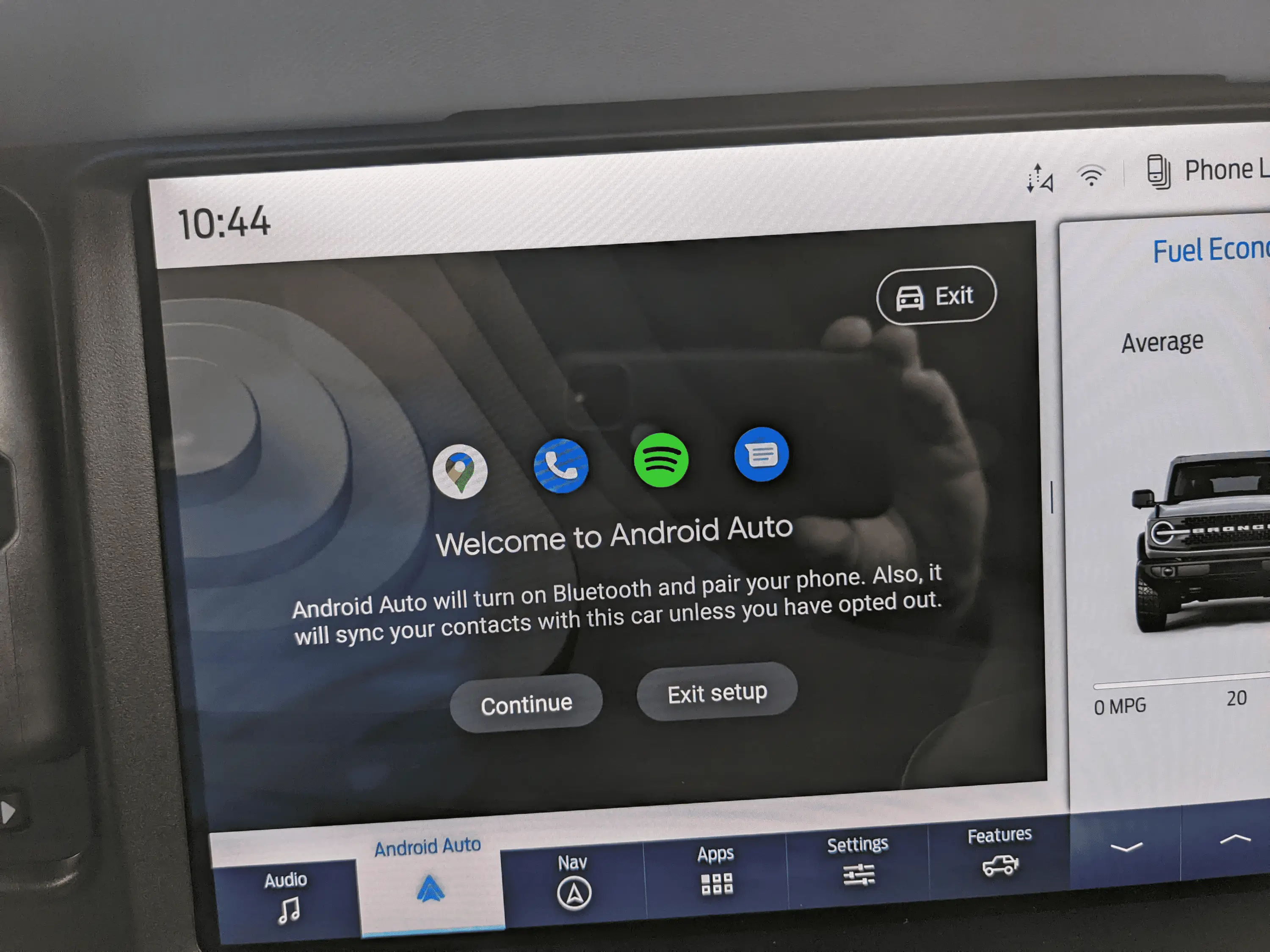
Until now. Setup progresses like normal, until it gets to the point when my phone screen says "continue setup on your vehicle's screen" and the Sync display looked like this:

Ford Bronco Android Auto wireless setup fails 1667840715818


Only one step left to complete, which is to tap the "Continue" button and let the two devices negotiate the connection. Except, nothing happens when I tap the button on my Sync screen. In fact, no matter how many times or for how long I pressed on this screen button, nothing happens.

Has anyone else experienced this in a new Bronco? As I said, I've seen this work without a hitch so many times in Ford vehicles, that I am really surprised (and annoyed) that, for some reason, it doesn't work with my new car.

I have managed to get Android Auto connected via USB, but even that is behaving strangely, because I am forced to set it up like a new vehicle connection every single time I plug it in.

My phone is a Pixel 5 running Android 13 with Android Auto version 8.3.624134.
Sponsored


Cartman3132

Black Diamond
Well-Known Member
Joined
Oct 28, 2021
Threads
4
Messages
357
Reaction score
915
Location
Hopedale MA
Vehicle(s)
F150
Your Bronco Model
Black Diamond
Just received my new Bronco on Friday, and upon entering the vehicle I immediately tried to get Android Auto set up. I've done this on a number of Ford vehicles over the last several years, included some with Sync 4 with wireless support, and have not ever experienced any glitches.

Until now. Setup progresses like normal, until it gets to the point when my phone screen says "continue setup on your vehicle's screen" and the Sync display looked like this:
1667840715818.png


Only one step left to complete, which is to tap the "Continue" button and let the two devices negotiate the connection. Except, nothing happens when I tap the button on my Sync screen. In fact, no matter how many times or for how long I pressed on this screen button, nothing happens.

Has anyone else experienced this in a new Bronco? As I said, I've seen this work without a hitch so many times in Ford vehicles, that I am really surprised (and annoyed) that, for some reason, it doesn't work with my new car.

I have managed to get Android Auto connected via USB, but even that is behaving strangely, because I am forced to set it up like a new vehicle connection every single time I plug it in.

My phone is a Pixel 5 running Android 13 with Android Auto version 8.3.624134.
I had no problems getting connected so I'm no help there but I have problems with it staying connected. I'll go weeks it'll be fine and then for 2 days it'll disconnect every 15min and I have reconnect it.
 

PWillette

Badlands
Well-Known Member
First Name
Parrie
Joined
Dec 28, 2020
Threads
44
Messages
3,549
Reaction score
6,106
Location
Maine
Vehicle(s)
'08 F250 Super Duty, '01 SS Camaro, '21 Bronco
Your Bronco Model
Badlands
No issues here setting up. In your photo the "continue" button doesn't appear to be ready, I believe it should be highlighted blue when ready which may be why it is not responding.
 

KillerPenz

Base
Well-Known Member
Joined
Nov 30, 2021
Threads
13
Messages
1,420
Reaction score
3,004
Location
North East
Vehicle(s)
2021 Bronco
Your Bronco Model
Base
Do any of the buttons on that screen work when you try to press them? I've had an issue in which I've connected to android auto and then no presses anywhere work. In my case, that was an Android Auto thing, disconnect by turning off Wi-Fi and turning back on. It re-connects and then I can press on the screen where needed. Might be worth a shot.
 

Headsong

Black Diamond
Well-Known Member
First Name
Jeff
Joined
Aug 23, 2020
Threads
57
Messages
6,005
Reaction score
9,819
Location
Kane County, Western Chicago area
Vehicle(s)
22 Black Diamond non squatch 4 door softtop v6
Your Bronco Model
Black Diamond
Clubs
 
Just re-installed yesterday after Pixel 3 died. After plugging in, it was pretty automatic....
 

Sponsored

ChrisB351

Black Diamond
Well-Known Member
First Name
Chris
Joined
Jan 4, 2022
Threads
17
Messages
1,834
Reaction score
3,479
Location
Shreveport, LA
Vehicle(s)
2022 Bronco with correct amount of doors... 1993 Mustang GT
Your Bronco Model
Black Diamond
Clubs
 
Only issue Ive had is my AA screen will intermittently freeze. Ill have to pull over and shut it all down then itll work. I had my buddy at a dealer run an update the other day. So far so good.
 

Ford Motor Company

First Edition
Well-Known Member
Official Ford Account
First Name
Ford
Joined
May 25, 2021
Threads
17
Messages
6,913
Reaction score
8,271
Location
Dearborn
Vehicle(s)
Bronco, Bronco Sport
Your Bronco Model
First Edition
Just received my new Bronco on Friday, and upon entering the vehicle I immediately tried to get Android Auto set up. I've done this on a number of Ford vehicles over the last several years, included some with Sync 4 with wireless support, and have not ever experienced any glitches.

Until now. Setup progresses like normal, until it gets to the point when my phone screen says "continue setup on your vehicle's screen" and the Sync display looked like this:

1667840715818.png


Only one step left to complete, which is to tap the "Continue" button and let the two devices negotiate the connection. Except, nothing happens when I tap the button on my Sync screen. In fact, no matter how many times or for how long I pressed on this screen button, nothing happens.

Has anyone else experienced this in a new Bronco? As I said, I've seen this work without a hitch so many times in Ford vehicles, that I am really surprised (and annoyed) that, for some reason, it doesn't work with my new car.

I have managed to get Android Auto connected via USB, but even that is behaving strangely, because I am forced to set it up like a new vehicle connection every single time I plug it in.

My phone is a Pixel 5 running Android 13 with Android Auto version 8.3.624134.
Hello. I would like to see what I can do to assist with this Android Auto issues. can you send over a message with your VIN and the name/location of your local Ford dealer to get started?
 

Crash98

Wildtrak
Well-Known Member
First Name
Viet
Joined
Aug 16, 2022
Threads
8
Messages
137
Reaction score
111
Location
Bremerton, WA
Vehicle(s)
2017 Ford F-150
Your Bronco Model
Wildtrak
After you hit continue on the Sync screen, did you go back to your phone? I believe there is 1 more step on the phone where you allow or deny access to your phone contacts. It doesn't show until the message about finishing set up on your car screen disappears.
 

VIRUS

Badlands
Well-Known Member
First Name
D
Joined
Oct 6, 2020
Threads
1
Messages
769
Reaction score
1,637
Location
Wisconsin
Vehicle(s)
Truck, car, feet
Your Bronco Model
Badlands
I had no problems getting connected so I'm no help there but I have problems with it staying connected. I'll go weeks it'll be fine and then for 2 days it'll disconnect every 15min and I have reconnect it.
Similar experience with mine except I've never gone weeks with it working fine. Lucky if it goes a full day.
Wireless, it says connection to phone lost, several times a day. Plugged in, It often disconnects, have to unplug and reconnect.
Frequently, it plays two sources simultaneously. Again, unplug and reconnect.
Has not worked right from the start. My hope is that an update will fix it. If one comes.
 

Mikey D

Outer Banks
Well-Known Member
First Name
Mike
Joined
Dec 8, 2021
Threads
43
Messages
309
Reaction score
309
Location
Ormond Beach, FL
Website
www.mikedelninno.com
Vehicle(s)
2005 Ford Explorer
Your Bronco Model
Outer Banks
Clubs
 
Just received my new Bronco on Friday, and upon entering the vehicle I immediately tried to get Android Auto set up. I've done this on a number of Ford vehicles over the last several years, included some with Sync 4 with wireless support, and have not ever experienced any glitches.

Until now. Setup progresses like normal, until it gets to the point when my phone screen says "continue setup on your vehicle's screen" and the Sync display looked like this:

1667840715818.png


Only one step left to complete, which is to tap the "Continue" button and let the two devices negotiate the connection. Except, nothing happens when I tap the button on my Sync screen. In fact, no matter how many times or for how long I pressed on this screen button, nothing happens.

Has anyone else experienced this in a new Bronco? As I said, I've seen this work without a hitch so many times in Ford vehicles, that I am really surprised (and annoyed) that, for some reason, it doesn't work with my new car.

I have managed to get Android Auto connected via USB, but even that is behaving strangely, because I am forced to set it up like a new vehicle connection every single time I plug it in.

My phone is a Pixel 5 running Android 13 with Android Auto version 8.3.624134.
YES. Tried to set up wireless. Worked once and then never got to sync again. I plugged in USB and got it to work, but it continually drops, and I have to reconnect. @Ford Motor Company If Ford figures out a fix, let us know.
 

Sponsored
OP
OP
tboettcher14

tboettcher14

Badlands
Well-Known Member
First Name
Tom
Joined
Aug 12, 2022
Threads
1
Messages
48
Reaction score
74
Location
Royal Oak, Michigan
Vehicle(s)
Bronco
Your Bronco Model
Badlands
Clubs
 
Do any of the buttons on that screen work when you try to press them? I've had an issue in which I've connected to android auto and then no presses anywhere work. In my case, that was an Android Auto thing, disconnect by turning off Wi-Fi and turning back on. It re-connects and then I can press on the screen where needed. Might be worth a shot.
Yes, all the other buttons do something, but that something is simply to cancel the setup and ask whether I want to permanently disable Android Auto from connecting.

Thanks for the suggestion about switching WiFi off and on. Unfortunately, it does not do the trick.
 

Cartman3132

Black Diamond
Well-Known Member
Joined
Oct 28, 2021
Threads
4
Messages
357
Reaction score
915
Location
Hopedale MA
Vehicle(s)
F150
Your Bronco Model
Black Diamond
Similar experience with mine except I've never gone weeks with it working fine. Lucky if it goes a full day.
Wireless, it says connection to phone lost, several times a day. Plugged in, It often disconnects, have to unplug and reconnect.
Frequently, it plays two sources simultaneously. Again, unplug and reconnect.
Has not worked right from the start. My hope is that an update will fix it. If one comes.
I get the wireless is new tech but it's almost like they forgot a line on their coding or a chip that it's so glitchy. And right, where is the update, there's no way we're the only 2 complaints.
 
OP
OP
tboettcher14

tboettcher14

Badlands
Well-Known Member
First Name
Tom
Joined
Aug 12, 2022
Threads
1
Messages
48
Reaction score
74
Location
Royal Oak, Michigan
Vehicle(s)
Bronco
Your Bronco Model
Badlands
Clubs
 
Well, I don't know exactly what did it, as I was trying a lot of different tricks to get it working, but finally did get wireless connection working this evening. One of the steps I tried during the day was to uninstall the Android Auto updates from my phone completely and then re-install them. I'm guessing that is what made it finally work, but I don't really know.

It worked for my entire commute home without glitching, but that was only about 30 minutes, so I don't know yet how much trouble this is going to give me going forward. For now I guess I'm just glad to have it working "some of the time."
 

JBlanco

Base
Well-Known Member
First Name
Julio
Joined
Sep 21, 2021
Threads
21
Messages
1,200
Reaction score
2,441
Location
Charlotte NC
Vehicle(s)
2023 Bronco BaseSquatch, 2023 Tesla Y Performance
Your Bronco Model
Base
I don't have AA on my cars but I travel often and install it in rentals. My phone is an old Note 9 but it always freezes when the phone is on battery saver mode. It all works great when I turn off the feature... It took me a while to fix.
 

Rob_Broncowski

Outer Banks
Well-Known Member
Joined
Aug 11, 2020
Threads
2
Messages
141
Reaction score
234
Location
MA
Vehicle(s)
'22 OBX, Ducati Scrambler
Your Bronco Model
Outer Banks
YES. Tried to set up wireless. Worked once and then never got to sync again. I plugged in USB and got it to work, but it continually drops, and I have to reconnect. @Ford Motor Company If Ford figures out a fix, let us know.
This sounds right in line with my experience as well.
Sponsored


Top