
- First Name
- Tom
- Joined
- Aug 12, 2022
- Threads
- 1
- Messages
- 48
- Reaction score
- 74
- Location
- Royal Oak, Michigan
- Vehicle(s)
- Bronco
- Your Bronco Model
- Badlands
- Thread starter
- #1
Just received my new Bronco on Friday, and upon entering the vehicle I immediately tried to get Android Auto set up. I've done this on a number of Ford vehicles over the last several years, included some with Sync 4 with wireless support, and have not ever experienced any glitches.
Until now. Setup progresses like normal, until it gets to the point when my phone screen says "continue setup on your vehicle's screen" and the Sync display looked like this:

Only one step left to complete, which is to tap the "Continue" button and let the two devices negotiate the connection. Except, nothing happens when I tap the button on my Sync screen. In fact, no matter how many times or for how long I pressed on this screen button, nothing happens.
Has anyone else experienced this in a new Bronco? As I said, I've seen this work without a hitch so many times in Ford vehicles, that I am really surprised (and annoyed) that, for some reason, it doesn't work with my new car.
I have managed to get Android Auto connected via USB, but even that is behaving strangely, because I am forced to set it up like a new vehicle connection every single time I plug it in.
My phone is a Pixel 5 running Android 13 with Android Auto version 8.3.624134.
Until now. Setup progresses like normal, until it gets to the point when my phone screen says "continue setup on your vehicle's screen" and the Sync display looked like this:
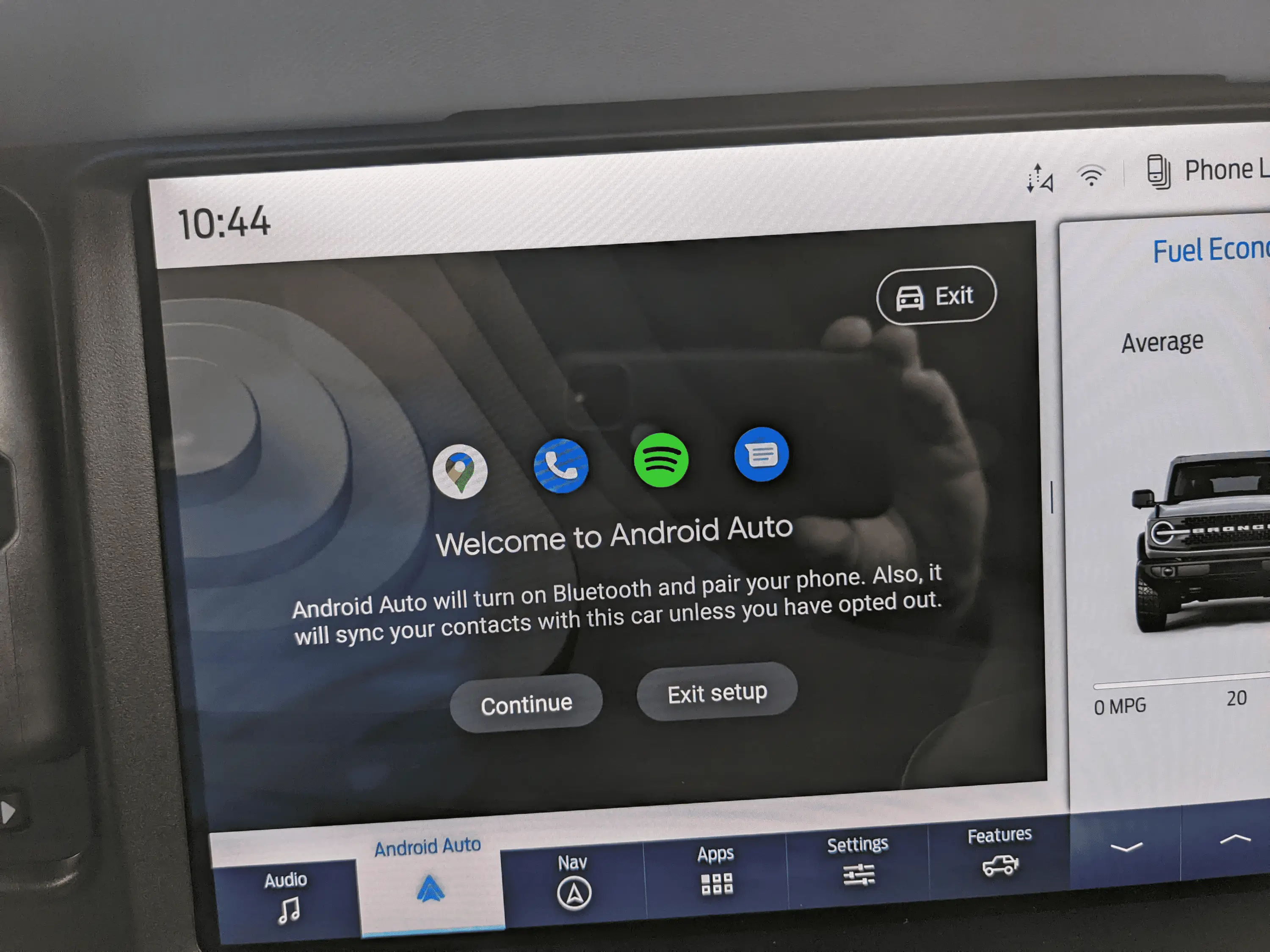
Only one step left to complete, which is to tap the "Continue" button and let the two devices negotiate the connection. Except, nothing happens when I tap the button on my Sync screen. In fact, no matter how many times or for how long I pressed on this screen button, nothing happens.
Has anyone else experienced this in a new Bronco? As I said, I've seen this work without a hitch so many times in Ford vehicles, that I am really surprised (and annoyed) that, for some reason, it doesn't work with my new car.
I have managed to get Android Auto connected via USB, but even that is behaving strangely, because I am forced to set it up like a new vehicle connection every single time I plug it in.
My phone is a Pixel 5 running Android 13 with Android Auto version 8.3.624134.
Sponsored