
Sponsored

When does the MPG value get calculated?

HolidayDog

Everglades
Well-Known Member
First Name
Eric
Joined
Nov 20, 2023
Threads
14
Messages
368
Reaction score
637
Location
MT
Vehicle(s)
24 Everglades
Your Bronco Model
Everglades
Clubs
 
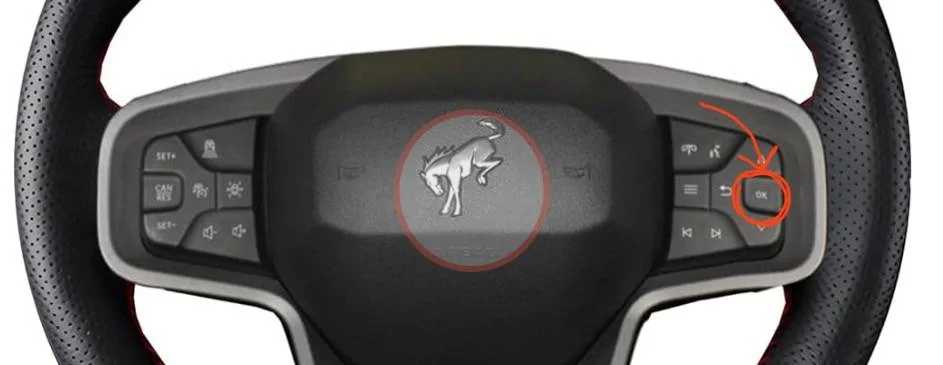
On your steering wheel on the right hand side button panel there is a button that says “ok”
Use the up/down buttons to navigate to the fuel efficiency/mpg screen. Hold the ok button down until you see a green line indicator show the process is complete.

You can also reset your “trip1” and “trip2” using the same button. The trip and fuel efficiency mpg readings are not connected. If you reset one the other is not reset. You would need to reset both if you want mpg to be the same.

Ford Bronco When does the MPG value get calculated? IMG_3297
Sponsored


orion

Black Diamond
Well-Known Member
First Name
Jeremy
Joined
Nov 23, 2020
Threads
17
Messages
1,299
Reaction score
3,194
Location
Colorado
Vehicle(s)
17' F-250, 17' Explorer
Your Bronco Model
Black Diamond
Clubs
 
Also, on the Distance to Empty (DTE), the Towing calculation will update your DTE more frequently than the Normal calculation.
 

Brian_B

Big Bend
Well-Known Member
First Name
Brian
Joined
Sep 14, 2023
Threads
60
Messages
8,230
Reaction score
14,570
Location
Central CA
Vehicle(s)
'23 BB 4dr 7MT, '22 BSport OBX, '87 B-II XL
Your Bronco Model
Big Bend
Clubs
 
Also, on the Distance to Empty (DTE), the Towing calculation will update your DTE more frequently than the Normal calculation.
Ah is that what that does? I could never figure out the difference.
 

Scott R Nelson

Base
Well-Known Member
Joined
Sep 30, 2020
Threads
34
Messages
1,253
Reaction score
2,251
Location
Meridian, ID
Vehicle(s)
Mustang, Escape, 2-door Base Sasquatch
Your Bronco Model
Base
Clubs
 
The first few answers here were looking hopeless, but "Fly by Nite" and "HolidayDog" gave the right answers.

My Bronco keeps three different MPG averages, one for Trip 1, one for Trip 2, and the one on the round fuel economy gauge. When you go to each of those screens, at the bottom it will say "Hold OK to reset" for a few seconds. No need to look it up in a manual if you pay attention.

Every once in a while I will forget to reset after filling my fuel tank, then wonder why the number isn't changing as expected. "Oh Duh! Forgot to reset."

I pay way too much attention to the fuel economy gauge, trying to get another 0.1 improvement. I'll often switch to the screen that shows boost pressure, two temperatures, and the voltage just so I won't feel guilty stepping on the accelerator once in a while. ;)
 

Brian_B

Big Bend
Well-Known Member
First Name
Brian
Joined
Sep 14, 2023
Threads
60
Messages
8,230
Reaction score
14,570
Location
Central CA
Vehicle(s)
'23 BB 4dr 7MT, '22 BSport OBX, '87 B-II XL
Your Bronco Model
Big Bend
Clubs
 
I ignore the MPG calc entirely - it's wildly optimistic.

The DTE figure though - usually spot on.

That's not suspicious at all. :unsure:
 

Sponsored

GI_Jo_Nathan

Black Diamond
Well-Known Member
First Name
Jonathan
Joined
Jul 30, 2021
Threads
6
Messages
1,970
Reaction score
3,548
Location
32571
Vehicle(s)
'23 Iconic Silver 2dr Manual Black Diamond
Your Bronco Model
Black Diamond
I definitely agree with above couple of posts. Honestly when I care to worry about it I tend to use my boost gauge as my fuel economy gauge.
 

CalvinT

Badlands
Well-Known Member
First Name
Calvin
Joined
Mar 15, 2022
Threads
16
Messages
2,445
Reaction score
3,076
Location
Phoenix, AZ
Vehicle(s)
2002 Subaru WRX Wagon, 2023 Badlands (nonSAS)
Your Bronco Model
Badlands
Clubs
 
I figure it uses fuel flow data (or injector pulse width) and the odometer. If it knows how much fuel is/has been used, and the distance, it can calculate mpg.
I agree. But there must be a rounding error in the calculation. It always says I'm getting better mileage than I really am. I keep a spreadsheet of miles driven and gas purchases and there's a 1 - 1.5 mpg error at each fill up. I reset Trip 1 each time I fill up.
 

DarthLincoln

Badlands
Well-Known Member
First Name
Chuck
Joined
Feb 11, 2022
Threads
2
Messages
927
Reaction score
2,303
Location
Northern California - Contra Costa County
Vehicle(s)
1999 BMW M coupe, 2023 Ford Bronco Badlands 2dr
Your Bronco Model
Badlands
Clubs
 
I agree. But there must be a rounding error in the calculation. It always says I'm getting better mileage than I really am. I keep a spreadsheet of miles driven and gas purchases and there's a 1 - 1.5 mpg error at each fill up. I reset Trip 1 each time I fill up.
hmm, have you tried to check the accuracy of the odometer? Maybe the odometer is slightly over-counting the miles.
 

CalvinT

Badlands
Well-Known Member
First Name
Calvin
Joined
Mar 15, 2022
Threads
16
Messages
2,445
Reaction score
3,076
Location
Phoenix, AZ
Vehicle(s)
2002 Subaru WRX Wagon, 2023 Badlands (nonSAS)
Your Bronco Model
Badlands
Clubs
 
The computer uses the same odometer reading. Any error would cancel out.

I should say the odometer and the computer use the same distance traveled input.
 

Sponsored

Tricky Mike

Badlands
Well-Known Member
First Name
Mike
Joined
Jun 26, 2023
Threads
25
Messages
2,033
Reaction score
7,231
Location
USA
Vehicle(s)
21 Bronco
Your Bronco Model
Badlands
Clubs
 
Mine is optimistic by 1.8 mpg. If it says 21 and I check it at the pump, I actually got 19.2.

Jason
Have you checked it multiple times? Mine is usually within 0.5 mpg but has been both lower and higher than actual.
 
OP
OP
RaefordRider

RaefordRider

Black Diamond
Member
First Name
Tim
Joined
Oct 24, 2024
Threads
2
Messages
22
Reaction score
6
Location
Raeford, NC
Vehicle(s)
2024 Black Diamond Bronco
Your Bronco Model
Black Diamond
Trying to remember. I remember it was easy. You might try being on the regular screen, not one of the trip screens then holding down the OK button just as you would when resetting trip mileage.
Correct! I was out earlier and cleared the trips but it didn't clear that mpg...so on a whim, just from the regular screen, I hit the okay and it cleared it...and now it is showing live which it didn't appear to be prior. Thanks for the follow up!
 

Doc Rocket

Base
Well-Known Member
Joined
Jul 16, 2020
Threads
5
Messages
235
Reaction score
402
Location
US
Vehicle(s)
Ford Bronco, Base, Sasquatch
Your Bronco Model
Base
To preface this, I do not work for Ford, and I do not have special access to the programming. However, I have noted that the dash mileage is always a bit higher than what I calculate at the pump. What I think is happening is this:
I think that the dash calculation is a time average of the instantaneous mileage (ratio of fuel used from the engine computer and speed) (this is an easy calculation, based on information the engine/transmission computers would have available). However, what you get at the pump is the integration of fuel used and the integration of the speed, which is NOT the same calculation, and will only give the same value by accident. It is not even so much an inaccurate calculation, as a different calculation. They should be generally related, but would not track one-for-one. Just a thought on what might be happening here.
 

Beach_Bum

Outer Banks
Well-Known Member
First Name
Ken
Joined
Aug 12, 2020
Threads
42
Messages
9,176
Reaction score
30,382
Location
St. Augustine, FL
Vehicle(s)
2023 Outerbanks Bronco
Your Bronco Model
Outer Banks
Clubs
 
So I thought I had shared this to gen. pop., but I only shared it in a private conversation. What everyone will need to do is adjust their Actual Fuel Economy (AFE) bias that is accessed in engineering test mode.

First you will need to hand calculate your fuel economy over several fill-ups. You need an accurate odometer reading along with how many gallons you fill up with to calculate your fuel economy.

Once you have your set of data, average them. Take that Actual Fuel Economy average and divide by the Display Fuel Economy.* Move the decimal point 3 places and that will be your new AFE bias. The factory default is 1000.

*Note: For those who don't calculate their fuel economy in Freedom Units, then reverse the calculation (Display Fuel Economy divided by Actual Fuel Economy).

To enter engineering test mode, sit in the driver's seat and wait for all the displays to go blank/off.

Press and hold 'OK' on the steering wheel for 5 seconds. While still holding the 'OK' button, step on the brake and start the engine.

Continue to hold the 'OK' button until the center display (speedometer informational panel) displays Engineering Test Mode. Release the 'OK' button.

Scroll through the menu via the up/down arrows until you find the AFE Bias screen. Make the adjustment and save.

Turn off the engine and wait a few seconds and then restart. The new AFE bias will be used to display the actual fuel economy along with your miles to empty.
 

CalvinT

Badlands
Well-Known Member
First Name
Calvin
Joined
Mar 15, 2022
Threads
16
Messages
2,445
Reaction score
3,076
Location
Phoenix, AZ
Vehicle(s)
2002 Subaru WRX Wagon, 2023 Badlands (nonSAS)
Your Bronco Model
Badlands
Clubs
 
So I thought I had shared this to gen. pop., but I only shared it in a private conversation. What everyone will need to do is adjust their Actual Fuel Economy (AFE) bias that is accessed in engineering test mode.

First you will need to hand calculate your fuel economy over several fill-ups. You need an accurate odometer reading along with how many gallons you fill up with to calculate your fuel economy.

Once you have your set of data, average them. Take that Actual Fuel Economy average and divide by the Display Fuel Economy.* Move the decimal point 3 places and that will be your new AFE bias. The factory default is 1000.

*Note: For those who don't calculate their fuel economy in Freedom Units, then reverse the calculation (Display Fuel Economy divided by Actual Fuel Economy).

To enter engineering test mode, sit in the driver's seat and wait for all the displays to go blank/off.

Press and hold 'OK' on the steering wheel for 5 seconds. While still holding the 'OK' button, step on the brake and start the engine.

Continue to hold the 'OK' button until the center display (speedometer informational panel) displays Engineering Test Mode. Release the 'OK' button.

Scroll through the menu via the up/down arrows until you find the AFE Bias screen. Make the adjustment and save.

Turn off the engine and wait a few seconds and then restart. The new AFE bias will be used to display the actual fuel economy along with your miles to empty.
Thanks for the explanation! You say to hand calculate fuel economy over several fill-ups. This makes me wonder if the Display Fuel Economy is a running average and not a lifetime average. It also seems to me that I should keep my driving as consistent as possible for the fill-ups I'm using to calibrate. That means don't combine a 200-300 mile road trip with several fill-ups consisting of around town stop and go driving.

Or am I over thinking this?

I've been logging my fuel consumption from when I took delivery of my Bronco and logging mileage for each fill-up.
Sponsored


Top